No 21 · Comparison
The 6 Best Habit Tracker Apps In 2026, Compared
By Sebastian Röhl, creator of HabitKit
20 min read Published Updated
Habit trackers log what you do each day, count your streaks and show how consistent you have been. There are hundreds of them, and you don't need another one. You need one you will still open in three weeks.
Most never make it that far. They get installed in a burst of motivation, collect a few days of check marks and slide to the third page of the home screen. The app usually isn't the reason, but the wrong app makes it easier: too many settings, a paywall at the wrong moment, or progress you can't see without digging for it.
So we compared the habit trackers people actually ask about, read what their users praise and complain about, and narrowed the list to six that each do one job better than the rest.
Full disclosure: HabitKit is our app. We built it, and we put it first because it is the one we would pick. Every app here gets the same treatment anyway: real strengths, real weaknesses, and prices dated to the day we checked them. There are no affiliate links, and no app paid to be on this list.
Here is what we found.
-
 HabitKit · Best Overall
Every habit as a grid of days, one tap to log, on iPhone and Android with no account.
4.8/5 from HabitKit's editors
HabitKit · Best Overall
Every habit as a grid of days, one tap to log, on iPhone and Android with no account.
4.8/5 from HabitKit's editors
-
 Streaks · Best For Apple Devices
Apple Health completes habits for you, with a Watch app, for one $5.99 payment.
4.6/5 from HabitKit's editors
Streaks · Best For Apple Devices
Apple Health completes habits for you, with a Watch app, for one $5.99 payment.
4.6/5 from HabitKit's editors
-
 Habitify · Best For Syncing Everywhere
Phone, watch, Mac and web in sync, with automatic logging from health apps.
4.3/5 from HabitKit's editors
Habitify · Best For Syncing Everywhere
Phone, watch, Mac and web in sync, with automatic logging from health apps.
4.3/5 from HabitKit's editors
-
 Habitica · Best For Gamification
Your habits and to-dos become a role-playing game you can play with friends.
4.1/5 from HabitKit's editors
Habitica · Best For Gamification
Your habits and to-dos become a role-playing game you can play with friends.
4.1/5 from HabitKit's editors
-
 TickTick · Best For Tasks And Habits Together
A to-do list and calendar with a habit tracker built in, synced on every platform.
4.0/5 from HabitKit's editors
TickTick · Best For Tasks And Habits Together
A to-do list and calendar with a habit tracker built in, synced on every platform.
4.0/5 from HabitKit's editors
-
 Daylio · Best For Mood Journaling
Mood and activity entries in a few taps, with goals and a Year in Pixels on top.
3.8/5 from HabitKit's editors
Daylio · Best For Mood Journaling
Mood and activity entries in a few taps, with goals and a Year in Pixels on top.
3.8/5 from HabitKit's editors
Written by the maker of HabitKit, who wants you in the app that suits you. The stars are our own editorial rating out of five, not store ratings. Streaks, Habitify, Habitica, TickTick and Daylio are named for comparison only; HabitKit is not affiliated with their makers. Prices and features come from the US App Store, Google Play and each developer's own site on the date above.
On this page
Quick Comparison
| App | Best for | Price (US) | Platforms | Our rating |
|---|---|---|---|---|
| 1. HabitKit | Best overall | Free for four habits. Pro monthly, yearly or lifetime | iPhone, Android | 4.8/5 |
| 2. Streaks | Apple devices | $5.99 one-time | iPhone, iPad, Mac, Apple Watch, Vision Pro | 4.6/5 |
| 3. Habitify | Syncing everywhere | Free for three habits. From $29.99 a year | iPhone, iPad, Mac, Apple Watch, Android, Wear OS, web | 4.3/5 |
| 4. Habitica | Gamification | Free. Optional $4.99 a month or $47.99 a year | iPhone, iPad, Android, web | 4.1/5 |
| 5. TickTick | Tasks and habits together | Free for five habits. $4.99 a month or $49.99 a year | iPhone, iPad, Mac, Apple Watch, Android, Windows, web | 4.0/5 |
| 6. Daylio | Mood journaling | Free. Premium from $4.99 | iPhone, iPad, Android | 3.8/5 |
"Our rating" is our own judgment against the criteria below, not a store rating. Store ratings are listed in each app's section.
Feature By Feature
| HabitKit | Streaks | Habitify | Habitica | TickTick | Daylio | |
|---|---|---|---|---|---|---|
| iPhone | Yes | Yes | Yes | Yes | Yes | Yes |
| Android | Yes | No | Yes | Yes | Yes | Yes |
| Apple Watch app | No | Yes | Yes | No | Yes | No |
| Web or desktop | No | Mac | Yes | Web | Yes | No |
| Home screen widgets | Yes, with Pro | Yes | Yes | Yes | Yes | Yes |
| Completes habits from Apple Health | No | Yes | Yes | Not listed | Not listed | Not listed |
| Works without an account | Yes | Yes | Yes, on one device | No | Not checked | Yes |
| Free plan | Four habits | None | Three habits | The whole game | Five habits | Yes, with limits |
| One-time purchase | Yes, Lifetime | Yes, $5.99 | Yes, $119.99 | No | No | Not checked |
"Not listed" means the developer's store listing and help pages don't mention it; "Not checked" means we couldn't confirm it either way on the date at the top.
How We Evaluated
We looked at six things, in this order of weight:
- Logging takes one tap, or none. A habit you have to think about logging is a habit you stop logging.
- You can see your progress without reading. Rings, chains, grids and charts all try. Some work at a glance; some need a statistics tab.
- Widgets and reminders. The two features that decide whether an app is part of your day or buried in a folder.
- Price and the free plan. What you get for nothing, what the paid tier costs, and whether you can pay once.
- Platforms. Plenty of households mix iPhone and Android, and some people want their habits on a computer too.
- Your data. Whether you need an account, whether it syncs, and what the App Store privacy label says.
Every fact on this page comes from the app's App Store or Google Play listing, its developer's website or its help center, checked on the date at the top. For each app's weaknesses we also read its recent one and two-star reviews on Google Play, including HabitKit's.
The 6 Best Habit Tracker Apps
HabitKitNo 01 · Best Overall
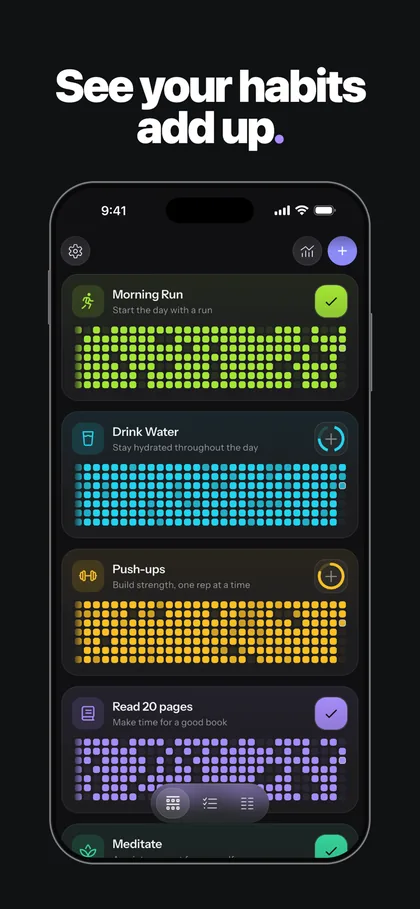
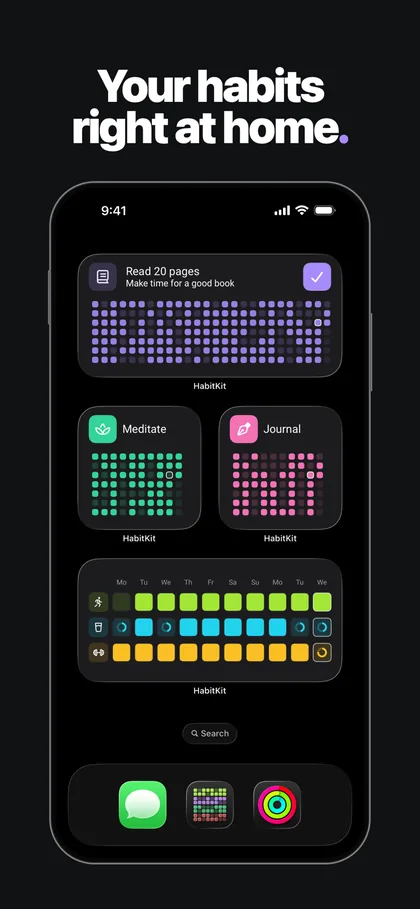
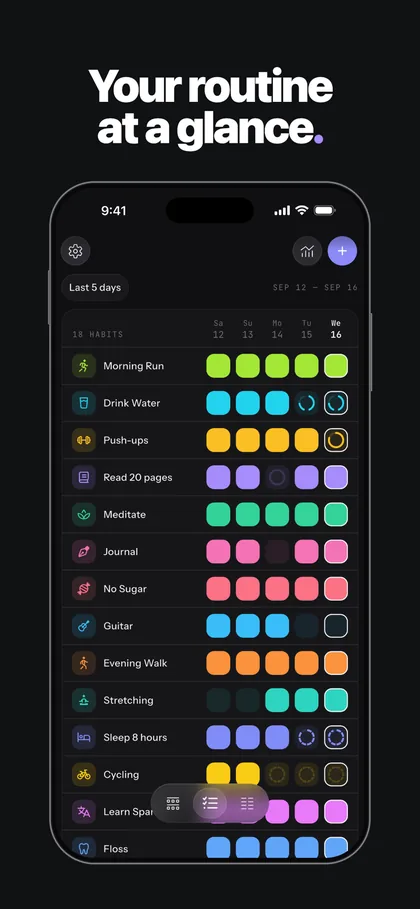
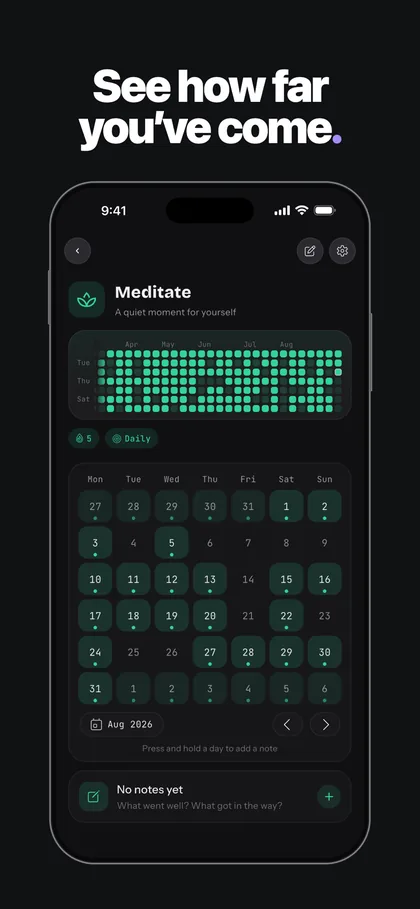
Screenshots from HabitKit's App Store listing.
Every habit is a grid. One tile per day, filled in the habit's colour, so a good month is a solid block and a bad one has holes in it. You don't read your progress, you see it, and the days before a broken streak stay on screen instead of resetting to zero.
That one picture is the reason HabitKit exists, and almost everything else is about keeping it effortless. One tap logs a Yes / No habit. Count habits step up with each tap, and Measure habits take an amount in your own unit, such as litres, pages or minutes, filling the day's tile partially as you go. Quit habits count clean days, and a Count or Measure quit habit can set a Stay Below limit, so "fewer than two coffees" can be the goal instead of none at all.
Reviewers keep coming back to the same thing. One wrote: "Didn't know I needed a habit tracker with GitHub like heat map." Another: "It's so effective to glance and see effort, that I've gotten a few friends into habit tracking by showing them what I'm up to."
What it does well
- Progress you can see at a glance. Months of every habit on the dashboard and on home screen widgets (how the grid works).
- Habits that aren't just yes or no. Counts, measured amounts with your own unit, and quit habits with a Stay Below limit (daily goals and multiple completions).
- No account. Your habits live on your phone, with seven daily backups beside them, a daily backup to your own iCloud on iPhone, and nothing to sign up for.
- The same app on iPhone and Android. A free export file moves your history between them in either direction (moving to a new phone).
- A free plan without a clock. Four habits are free for good, with notes, categories, quit habits and a reminder each.
Where it falls short
- No sync, no Apple Watch app and no Apple Health. If you want habits completed for you or logged from your wrist, Streaks or Habitify fit better.
- Widgets and a fifth habit need Pro. That is the most common complaint in HabitKit's own low-star reviews, and it's fair.
- No skip days. Days off are planned with weekly or monthly goals instead (taking a day off).
- Pricing
- Free for four habits. Pro adds unlimited habits, widgets, charts and extra reminders, as a monthly or yearly subscription or a one-time Lifetime purchase; prices vary by country and are shown in the app (what Pro unlocks).
- Platforms
- iPhone and Android.
- Ratings
- 4.8 from 2,455 ratings on the US App Store, 4.6 from 11,938 on Google Play.
StreaksNo 02 · Best For Apple Devices
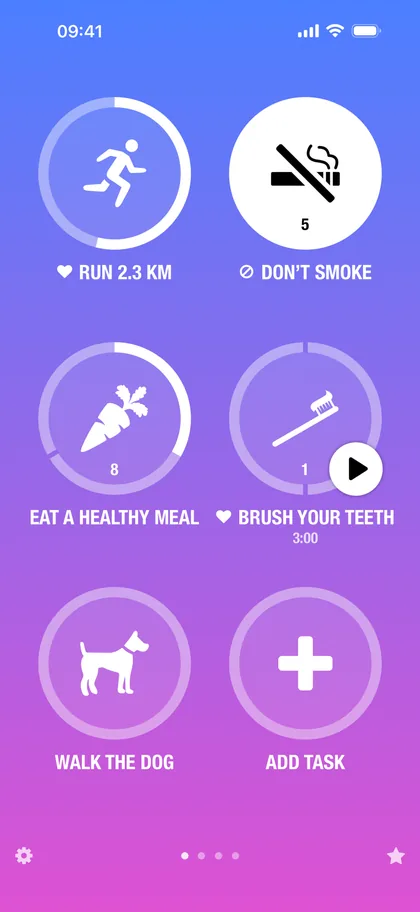
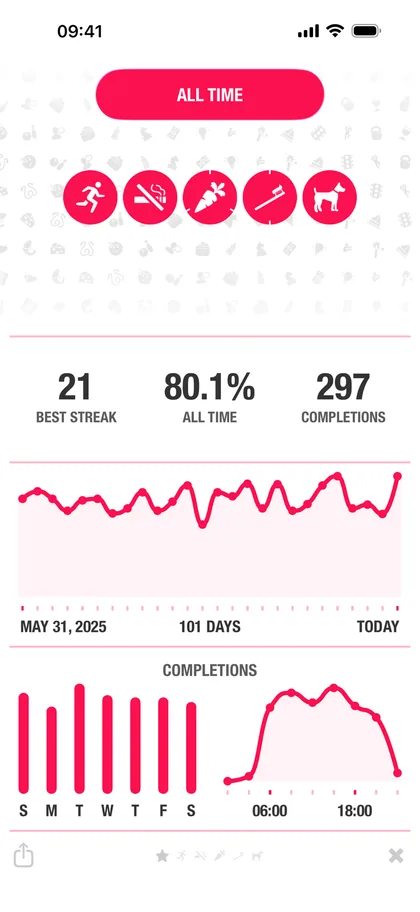
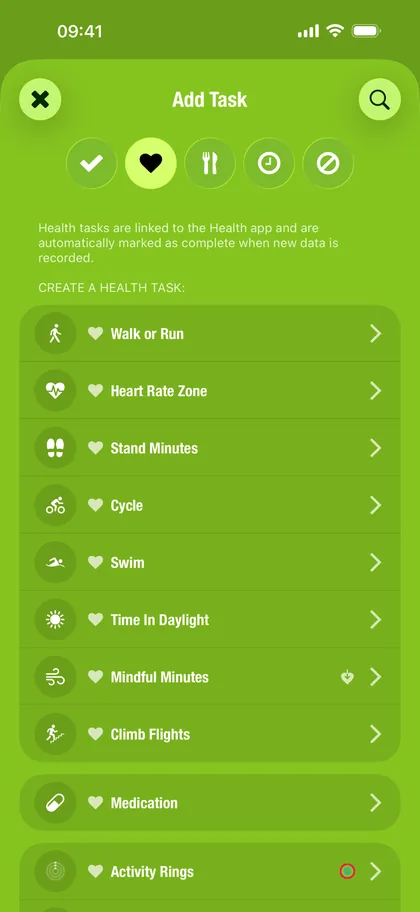
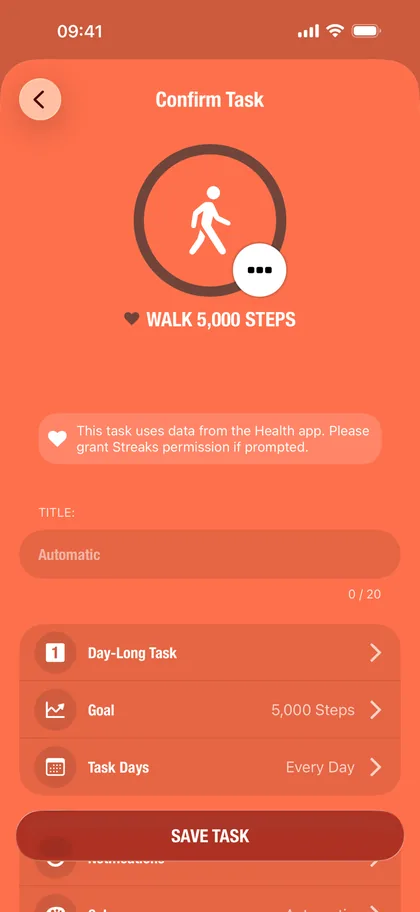
Screenshots from the Streaks listing on the App Store. Images by its developer.
Streaks is what a habit tracker looks like when Apple's whole platform is the brief. Each task is a big round button with its streak inside it, and it won an Apple Design Award for exactly that clarity.
Its real trick is that you may not need to tap at all. Connect Apple Health and Streaks completes "walk 5,000 steps", a workout or mindful minutes by itself, and the Apple Watch app logs everything else from your wrist. It handles negative tasks for habits you are breaking, timed tasks, and tasks shared with other Streaks users, and it syncs through iCloud with no account.
What it does well
- Apple Health auto-completion. Fitness habits finish themselves, which removes the most common way a tracker fails: forgetting to tap.
- A real Watch app. Complications and logging from the wrist.
- One payment. $5.99 once, no subscription, no in-app purchases.
- A lean privacy label. Only diagnostics, not linked to you.
Where it falls short
- Apple only. No Android and no web, so a switch of phone means starting over somewhere else.
- 24 tasks at most, and no free version to try first.
- Progress lives behind a tap. The main screen shows today; how a month went is in the statistics.
- Pricing
- $5.99 once on the US App Store, with no in-app purchases.
- Platforms
- iPhone, iPad, Mac, Apple Watch and Vision Pro.
- Ratings
- 4.8 from 27,349 ratings on the US App Store.
HabitifyNo 03 · Best For Syncing Everywhere
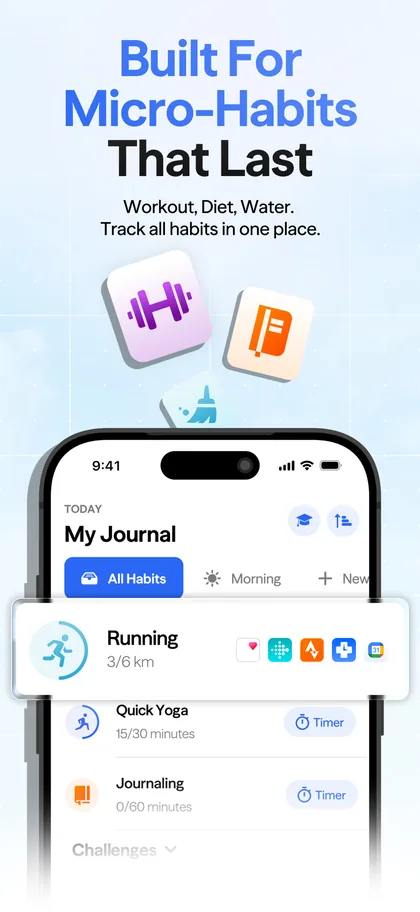
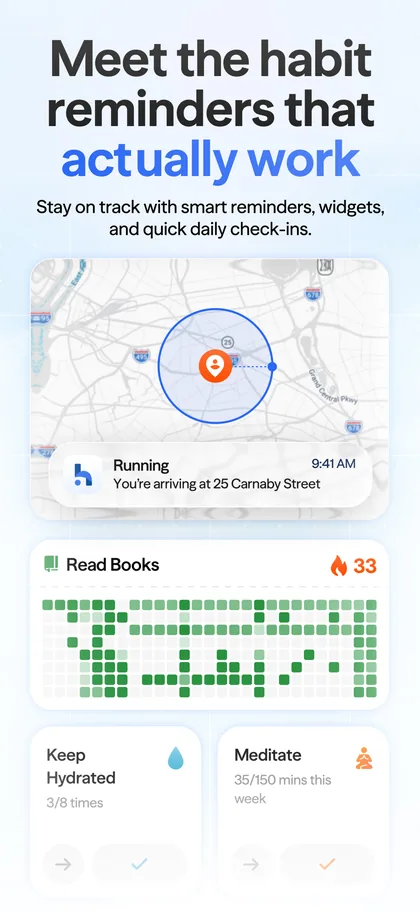
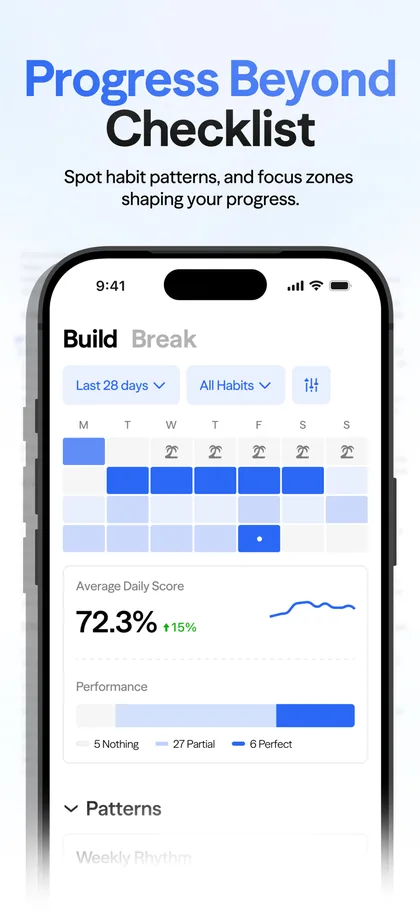
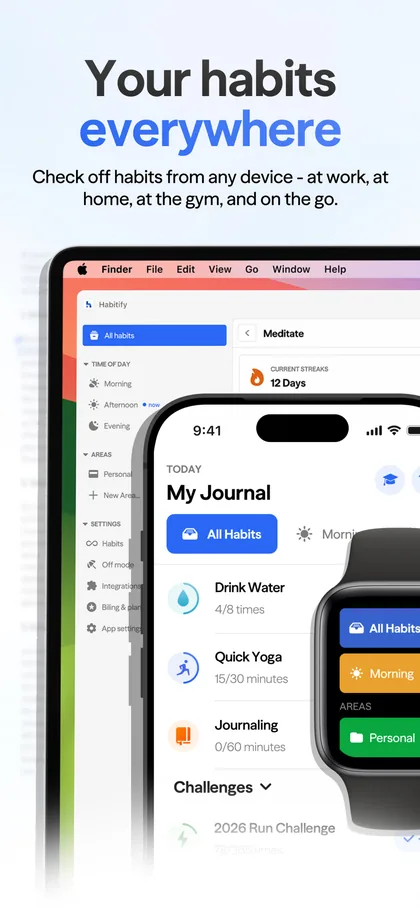
Screenshots from the Habitify listing on the App Store. Images by its developer.
Habitify is the tracker for people who want their habits everywhere. It runs on iPhone, iPad, Mac, Apple Watch, Android, Wear OS and the web, all synced, and it logs habits automatically from Apple Health, Health Connect, Fitbit, Strava and Screen Time.
It is also the most automatable app on this list. There is a public API, MCP support so an AI assistant can log habits and read your stats, App Intents and Siri, plus timers, mood tracking, location reminders and an Off Mode for holidays.
What it does well
- Every platform, in sync. Phone, watch, computer and browser.
- Automatic logging from health, fitness and screen-time data.
- Automation for power users. API, MCP, App Intents, Zapier and IFTTT.
- Detailed progress views, including scores and heatmaps.
Where it falls short
- The smallest free plan here. Three habits, one reminder each.
- Price. Pro runs $49.99 a year or $119.99 for life, and price is the most common theme in its recent low-star reviews.
- An account for sync. A guest account works, but only on one device.
- Pricing
- Free for three habits. Plus is $29.99 a year; Pro is $8.99 a month, $49.99 a year or $119.99 for life; Pro Family is $89.99 a year. Pro has a seven-day trial.
- Platforms
- iPhone, iPad, Mac, Apple Watch, Vision Pro, Android, Wear OS and the web.
- Ratings
- 4.6 from 7,139 ratings on the US App Store and 4.2 on Google Play.
HabiticaNo 04 · Best For Gamification
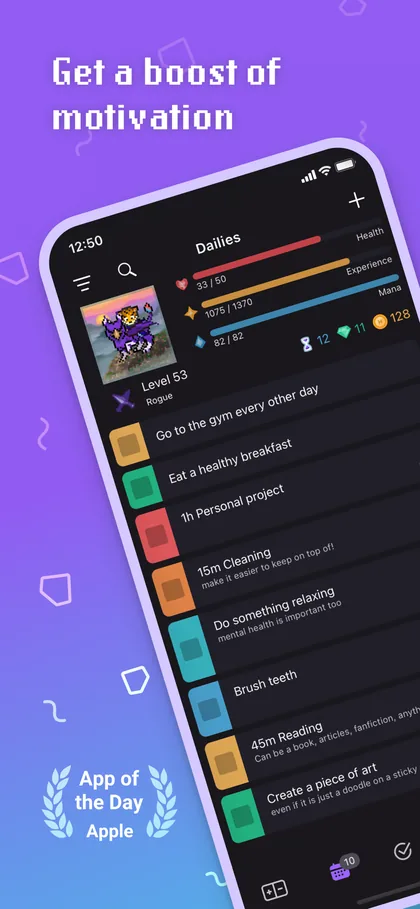
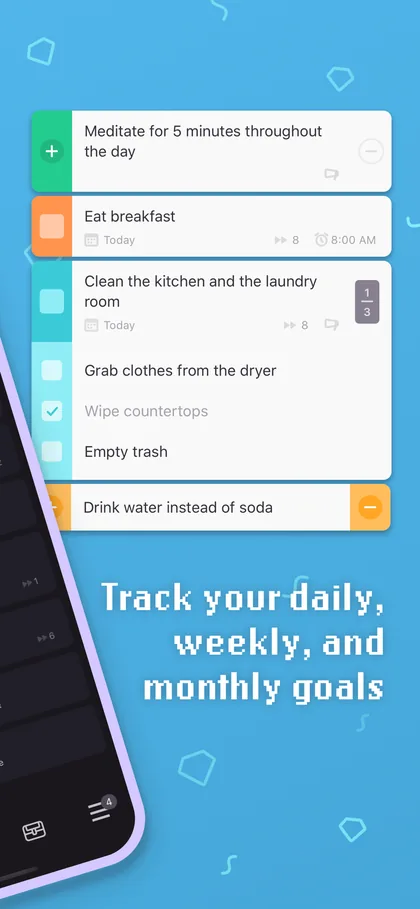
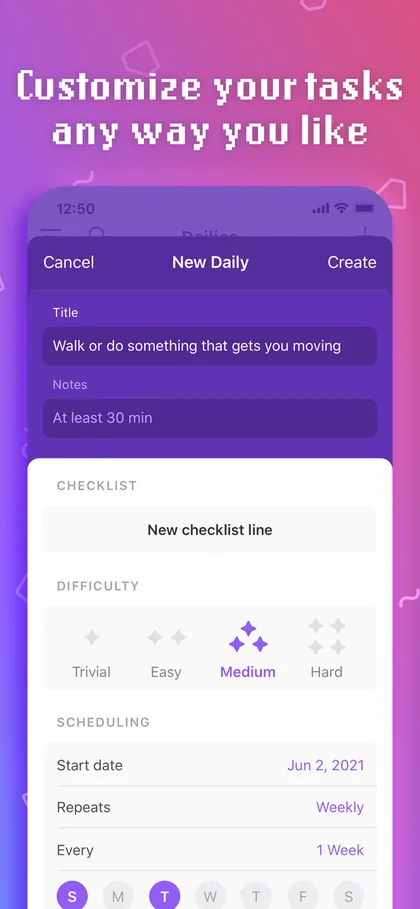

Screenshots from the Habitica listing on the App Store. Images by its developer.
If you have abandoned every tracker after a week, Habitica tries a different motivation: consequences. Your habits, daily tasks and to-dos drive a pixel-art character who gains experience and gold when you follow through and loses health when you don't.
Play with friends and it gets serious. Parties take on quests together, and one person skipping their dailies hurts the whole group. The game is free, it's open source, and it runs on the web as well as on your phone.
What it does well
- Real stakes. Missing a daily costs your character health, and your party feels it.
- Accountability with friends through parties, quests and challenges.
- A generous free core. The whole game can be played without paying.
- Habits, dailies and to-dos in one place, on phone and web.
Where it falls short
- The game is the interface. If you just want to see your consistency, the avatar, gear and pets get in the way.
- A learning curve. Recent reviews mention confusing onboarding and features that changed or disappeared.
- Ads on Android, an account required, and no Apple Watch app.
- Pricing
- Free. An optional subscription costs $4.99 a month, $14.99 for three months, $29.99 for six months or $47.99 a year, and gems are sold separately.
- Platforms
- iPhone, iPad, Vision Pro, Android, Wear OS and the web.
- Ratings
- 4.3 from 3,484 ratings on the US App Store, with more than 75,000 ratings on Google Play.
TickTickNo 05 · Best For Tasks And Habits Together
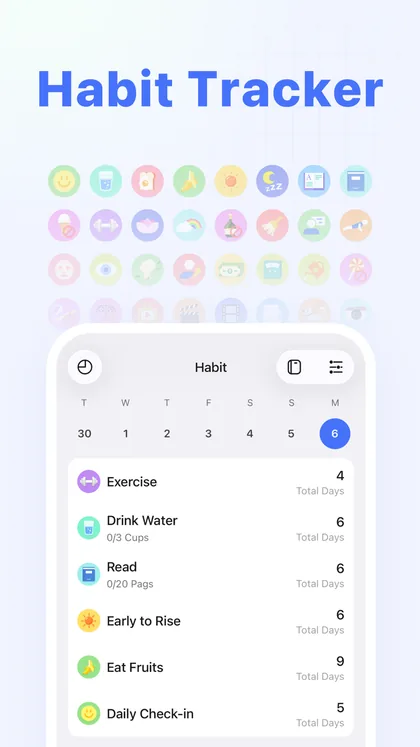
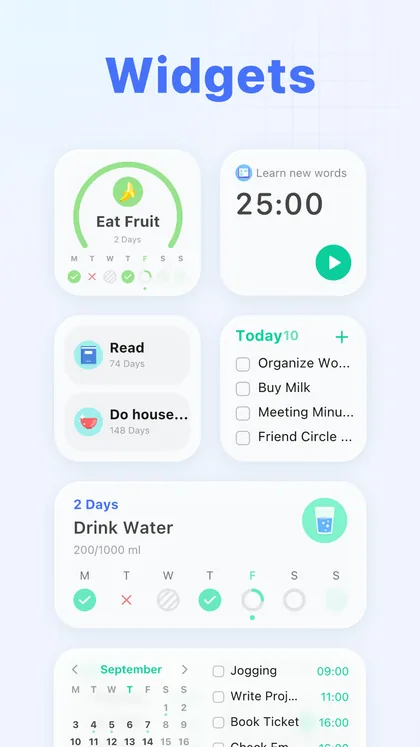
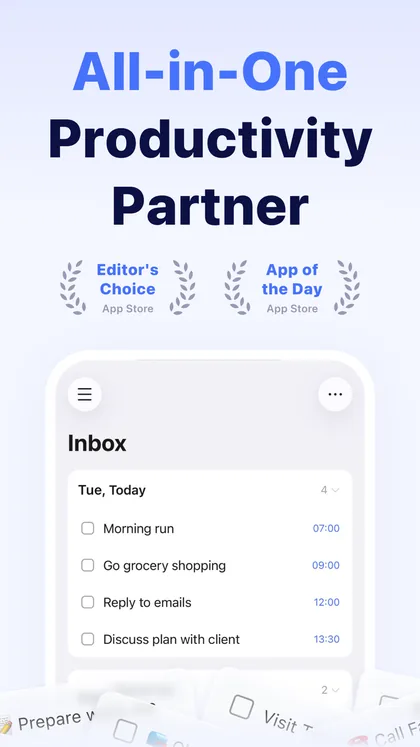
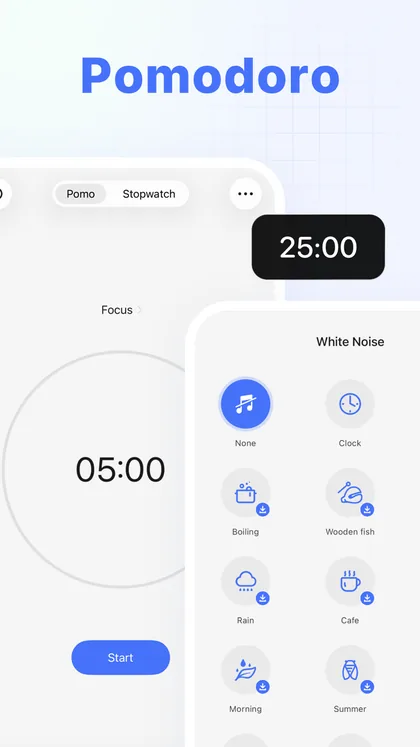
Screenshots from the TickTick listing on the App Store. Images by its developer.
TickTick is a to-do list first: tasks, a calendar, a Pomodoro timer and an Eisenhower matrix, synced across nearly every platform there is. The habit tracker is one module inside it, and it's a capable one, with a gallery of preset habits, goals and amounts, a yearly heat map per habit and habit widgets.
The appeal is having one app for the whole day. Your habits sit next to your tasks and your calendar, and a single subscription covers all of it.
What it does well
- One app for tasks, calendar, focus and habits.
- Every platform, including Windows, Mac, the web and Apple Watch.
- Habit widgets and a yearly heat map for each habit.
- Highly rated on both stores.
Where it falls short
- Habits are a side feature. The free plan allows five, and the monthly habit view is Premium.
- Price. Premium is $49.99 a year with no lifetime option, and recent reviews push back on the price.
- Built around an account, with a long list of data types on its privacy label.
- Pricing
- Free for five habits. Premium is $4.99 a month or $49.99 a year.
- Platforms
- iPhone, iPad, Mac, Apple Watch, Vision Pro, Android, Wear OS, Windows and the web.
- Ratings
- 4.9 from 46,263 ratings on the US App Store and 4.6 on Google Play.
DaylioNo 06 · Best For Mood Journaling
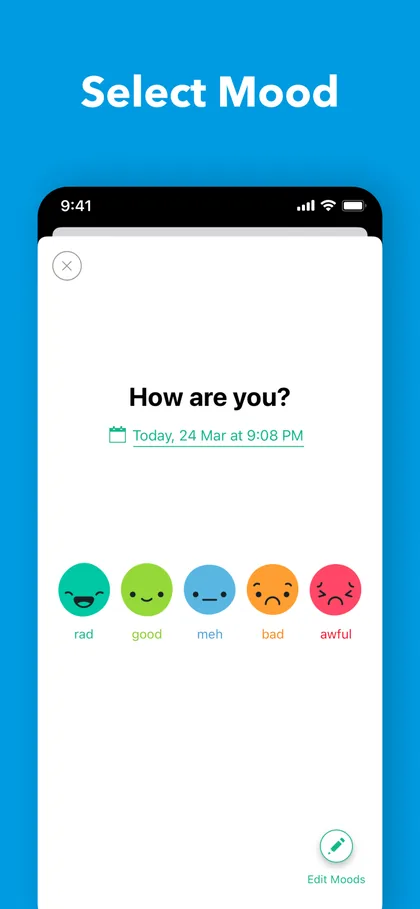
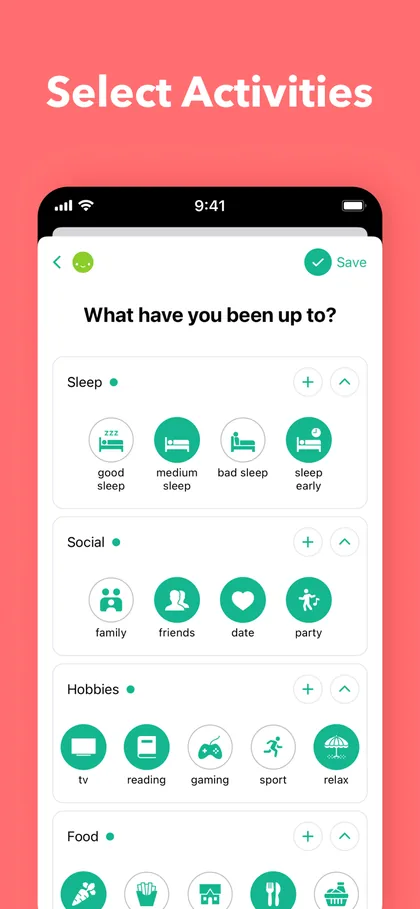
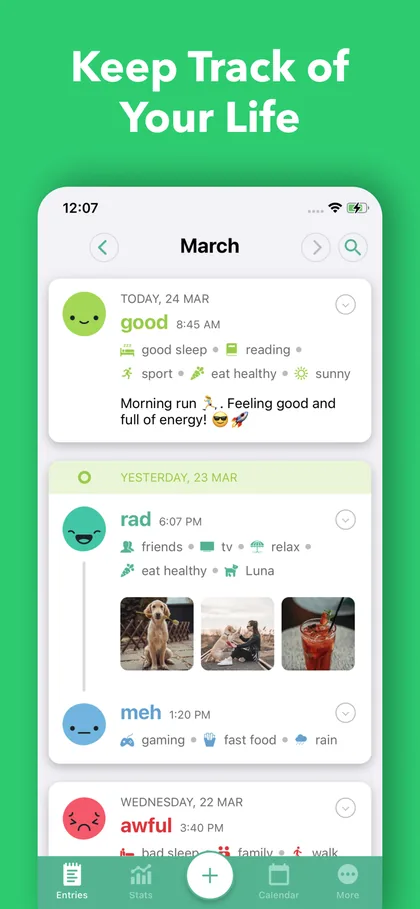
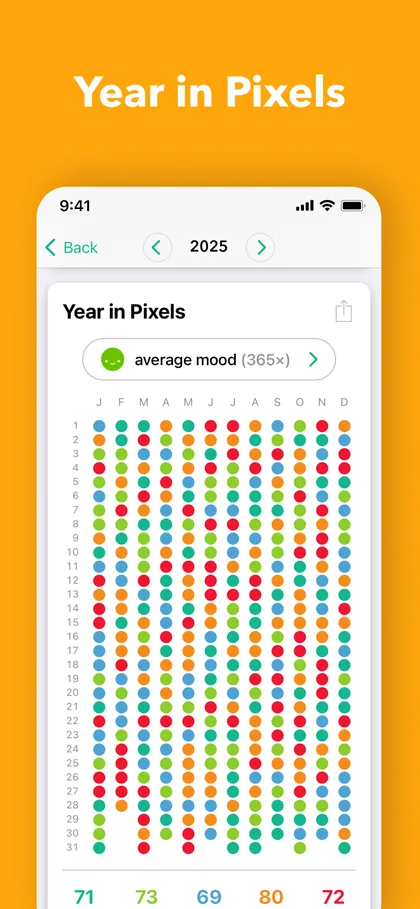
Screenshots from the Daylio listing on the App Store. Images by its developer.
Daylio is a journal you can fill in without writing. Pick a mood, tap the activities that made up your day, and that's an entry. Over weeks it shows which activities line up with your better days, and its Year in Pixels colours a whole year by mood.
Habits come in through goals: pick an activity, set how often you want to do it, and Daylio tracks the streak. It works without an account and keeps your data on your phone, with backups to iCloud or Google Drive.
What it does well
- The fastest journaling on this list. A few taps and the day is logged.
- Mood and activity patterns that a pure habit tracker can't show.
- Year in Pixels, a whole year of moods on one screen.
- No account, with backups and CSV or PDF export.
Where it falls short
- It's a journal first. Goals hang off activities, and unlimited goals need Premium.
- One device at a time. Daylio's own help says it is not designed to be used on several devices at once.
- Upsells. Recent Android reviews mention Premium prompts, and the Play listing shows it contains ads.
- Pricing
- Free, with Premium sold in the app from $4.99 and a seven-day trial.
- Platforms
- iPhone, iPad, Vision Pro and Android.
- Ratings
- 4.8 from 61,933 ratings on the US App Store and 4.7 on Google Play.
Which Habit Tracker App Should You Pick?
The short version:
- If you want to see your habits at a glance, with one tap to log and no account, on iPhone or Android: pick HabitKit.
- If you live entirely inside Apple and want Apple Health and your Watch to do the logging: pick Streaks.
- If you need your habits on every device, including a computer and a browser: pick Habitify.
- If ordinary trackers bore you and you want a game with friends: pick Habitica.
- If your habits belong in your to-do list: pick TickTick.
- If you want to track your mood as much as your habits: pick Daylio.
Torn between the top two? Our HabitKit vs Streaks comparison goes through every difference. Weighing HabitKit's free plan against Pro? Here is exactly what Pro adds, and what it does not.
Living with ADHD? Our guide to habit tracker apps for ADHD weighs the research on reminders, tracking and missed days, and which apps fit. Looking for something gentler than a tracker? HabitKit vs Finch compares a habit grid with a self-care pet.
No app is right for everyone. The best habit tracker is the one you will open tomorrow morning.
Best Habit Tracker Apps For iPhone
HabitKit puts your habits' grids on the home screen as widgets, and seven Shortcuts actions let Siri or an automation log for you, for example when a workout ends (Siri and Shortcuts).
Streaks has the deepest Apple integration of any app here. Apple Health completes tasks by itself, the Watch app is a full logger, and iCloud keeps your iPhone, iPad and Mac in step.
Daylio is worth a look if a quick daily mood entry is the habit you want most; it syncs with Apple Health and has a large calendar widget.
Best Habit Tracker Apps For Android
HabitKit is the same app on Android as on iPhone, with home screen widgets and notification buttons that complete a habit without opening the app (reminders).
Habitica and TickTick both run on Android, Wear OS and the web. Habitica is the one for a game, TickTick the one for tasks.
If you want everything free on Android, Loop Habit Tracker is open source with no limits, though it has no iPhone version (HabitKit vs Loop).
Frequently Asked Questions
What Is The Best Free Habit Tracker App?
Habitica's whole game is free, and Loop Habit Tracker is free with no limits on Android. HabitKit's free plan covers four habits for good, with reminders, notes and backups, and no account.
Do Habit Tracker Apps Actually Work?
A tracker doesn't build the habit for you, but recording it helps you notice patterns and come back after a missed day. How long the process takes varies a lot from person to person; our guide on how long it really takes to form a habit walks through the research.
What Is The Best Habit Tracker App For iPhone?
For seeing your progress at a glance, HabitKit. For Apple Health and Apple Watch, Streaks.
Is There A Habit Tracker App With Widgets?
All six have widgets. HabitKit's show each habit's grid on your home screen on iPhone and Android, as part of Pro (adding a widget). Our guide to habit tracker apps with widgets compares what each widget shows and which ones you can tick from.
Which Habit Tracker Has No Subscription?
Streaks is a one-time $5.99 purchase. HabitKit and Habitify both offer a lifetime option alongside their subscriptions, and Habitica's core game is free. Our guide to habit trackers without a subscription covers every free and one-time option, including Loop on Android.
Can I Use One Habit Tracker On iPhone And Android?
Yes. HabitKit, Habitify, Habitica, TickTick and Daylio all run on both. Streaks is Apple only.
Final Thoughts
Habits don't form because you installed an app. They form because you keep showing up, and a good app makes showing up a little easier and a missed day a little less final.
Pick one app from this list and give it a month before you judge it. The most common mistake isn't choosing the wrong tracker; it's comparing trackers instead of starting. If you're unsure what to track first, start smaller than feels worthwhile, and read what one missed day does to a habit before the first one happens.
If you want to start right now, HabitKit is free for four habits, takes a minute to set up and keeps your habits on your phone. Get it on the App Store or Google Play.
Sources
Checked on the date at the top of this page. App names, icons and screenshots belong to their developers and are shown to identify and illustrate each app; HabitKit is not affiliated with any of them.
- HabitKit on the US App Store and Google Play
- Streaks on the US App Store and streaks.app
- Habitify on the US App Store, Google Play and its plans
- Habitica on the US App Store and Google Play
- TickTick on the US App Store, Google Play and TickTick Premium
- Daylio on the US App Store, Google Play and Daylio Premium features