No 22 · Comparison
HabitKit Vs Loop Habit Tracker: Which Fits You
By Sebastian Röhl, creator of HabitKit
10 min read Published Updated
Loop Habit Tracker is the free, open-source habit tracker for Android. It has no ads, no account, no in-app purchases and no internet permission, and it has more than five million downloads on Google Play. HabitKit runs on iPhone and Android, draws every habit as a grid of days, and is free for four habits with Pro for more.
On Android they overlap a lot: one-tap logging, measurable habits, widgets and notes. They differ in four places: where they run, how they show your progress, what they cost, and how actively they are developed.
HabitKit vs Loop Habit Tracker
-
Pick HabitKit if
- you use an iPhone, or might switch to one, or track habits with someone who does
- you want months of every habit visible at a glance on the main screen
- you want to quit a habit and count clean days, or set a daily limit
- you want up to three reminders a day for the same habit, plus a daily check-in
-
Pick Loop Habit Tracker if
- you're on Android and never want to pay anything
- you want open-source software that never connects to the internet
- you like a habit score that shows strength rather than a streak
Written by the maker of HabitKit, who wants you in the app that suits you. Loop Habit Tracker is named for comparison only; HabitKit is not affiliated with its maker. Prices and features come from the US App Store, Google Play and each developer's own site on the date above.
On this page
Side By Side
| HabitKit | Loop Habit Tracker | |
|---|---|---|
| Price (US) | Free for four habits. Pro monthly, yearly or lifetime | Free, no in-app purchases |
| Open source | No | Yes, GPLv3 |
| iPhone | Yes | No |
| Android | Yes | Yes, Google Play and F-Droid |
| How progress looks | A grid per habit, one tile per day | A habit score per habit, with charts |
| Habit types | Yes / No, Count, Measure and quit habits | Yes / No and measurable |
| Daily limits | Yes, Stay Below on quit habits | Yes, "at most" targets on measurable habits |
| Schedules | Every day, specific weekdays, X times a week or month, every few days | Every day, every X days, X times per week, month or Y days |
| Skip a day | No, days off are planned ahead | Yes, optional |
| Notes on a day | Yes | Yes |
| Reminders | One per habit free, three with Pro | One per habit |
| Home screen widgets | Three on Android, with Pro | Six, free |
| Charts | Yes, with Pro | Yes |
| Export and import | Yes, free | Yes, plus import from HabitBull, Rewire and Tickmate |
| Works without an account | Yes | Yes |
| Last update on Google Play | October 2026 | September 2025 |
| Google Play rating | 4.6 from about 12,000 ratings | 4.7 from about 63,500 ratings |
Facts are from each app's Google Play listing, Loop's website, FAQ and source code, and HabitKit's own help pages, on the date at the top of this page. HabitKit's prices vary by country and are shown in the app.
The Picture: A Grid Or A Score
This is the biggest difference in how the two apps feel.
Loop's signature is the habit score, a percentage that rises each time you do the habit and decays slowly when you don't. Its source code gives a daily habit a half-life of about 13 days, so one missed day after a long run barely dents it; Loop's FAQ says a perfect daily habit reaches 80% after a month and 99% after three. The listing makes the point directly: a few missed days after a long streak "will not completely destroy your entire progress", unlike other don't-break-the-chain apps. Each habit also has a calendar, a history chart, its best streaks and a breakdown by weekday, a tap away from the main list.
HabitKit puts the history itself on the main screen. Each habit is a grid, one tile per day, filled in the habit's colour, so you see months of every habit at once without opening anything. A missed day is one gap among the filled tiles, which makes the same point as Loop's score in a different way: the record doesn't reset. Count and Measure habits fill a day's tile partway, so 1.5 of your 2 litres looks different from a full day (how the grid works).
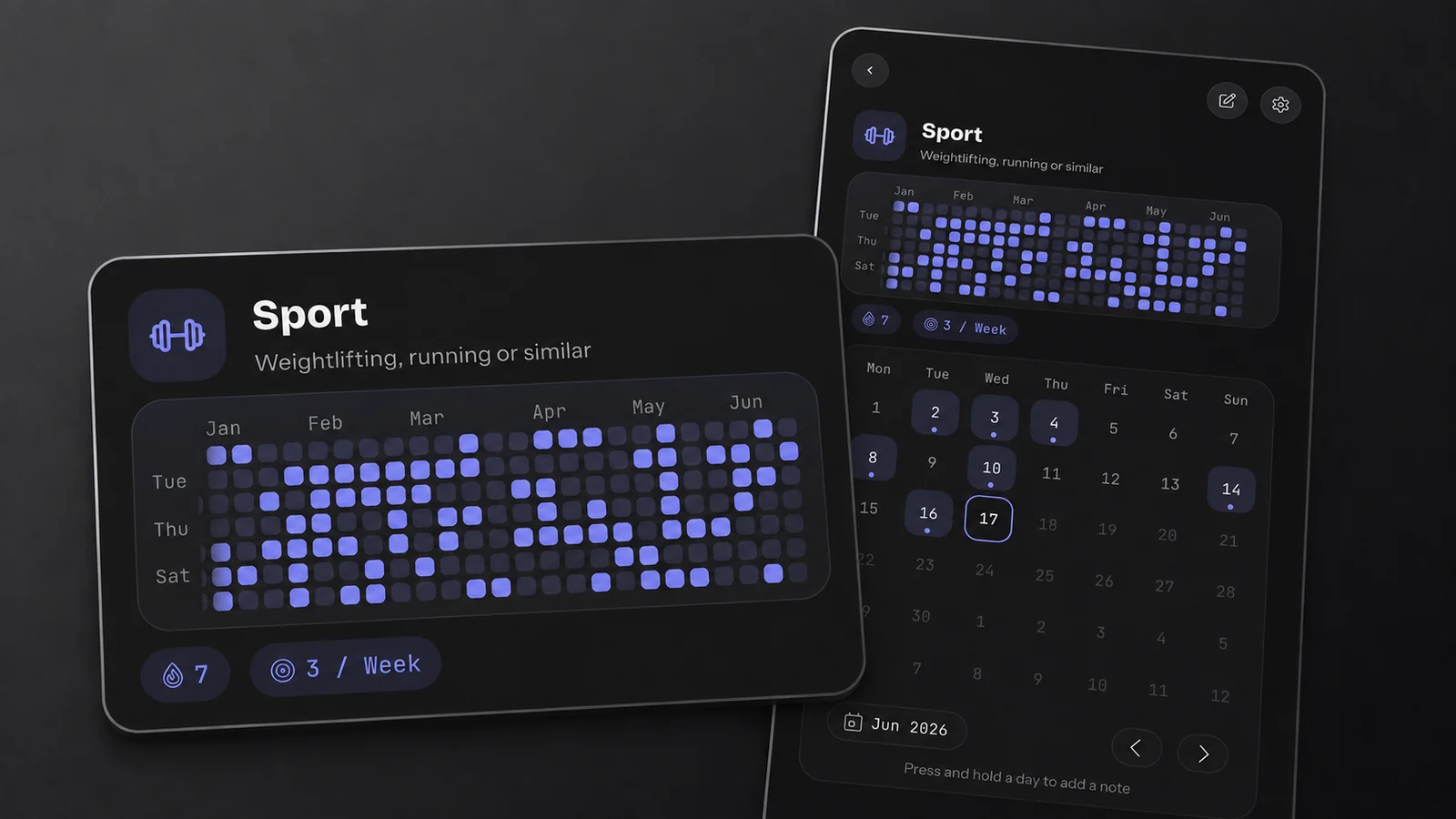
HabitKit's detail view, with demo data: six months of one habit on a single screen, the streak and weekly goal beneath it.
If you like a single number that sums up how established a habit is, Loop's score is a thoughtful design. If you'd rather see the days themselves, HabitKit's grid shows them without a tap.
What You Can Track
Both apps handle yes-or-no habits and amounts. Loop's measurable habits take a unit you type and a target of "at least" or "at most" per day, week or month. HabitKit's Count habits step up one at a time and Measure habits take an amount in your own unit.
The difference is in quitting. Loop tracks positive habits only; an "at most" target can cap something, but there's no habit type for counting clean days. HabitKit has quit habits that count the days you stayed away, and a Count or Measure quit habit can set a Stay Below limit, so "fewer than two coffees" can be the goal (tracking a habit you want to quit).
Both apps handle most schedules. Loop adds counts such as five times in ten days, and you can mark a day as skipped so it doesn't count against you. HabitKit can't skip a day afterwards; days off are planned ahead instead. A habit can repeat every few days or a number of times a week or month, so a weekly goal of five leaves two days off, and you can pick fixed weekdays, with the other days free (taking a day off).
Reminders And Widgets
Loop gives each habit one reminder, at one time on the weekdays you choose, and its notification has buttons to log it. Recent Google Play reviews report reminders arriving late or not at all on Android 16.
HabitKit gives each habit one reminder for free and up to three with Pro, plus a free daily check-in, and on Android the notification has buttons that complete the habit without opening the app (setting a reminder).
Widgets favour Loop on price. It has six widget types, all free and resizable, each showing one habit: Checkmark, which you tap to log, plus History, Score, Streaks, Frequency and Target, which open the habit. HabitKit has three on Android, all resizable and part of Pro: one habit's grid with a button for today, or a Compact Habit List of several habits where you can tap today or an earlier day (adding a widget).
Platforms And Development
Loop is Android only. Its FAQ says plainly that there is "currently no iOS version", the iOS request on GitHub is still open, and in December 2025 the project turned down a proposal to rebuild it for iPhone in SwiftUI. If you switch to an iPhone, Loop can't come with you.
HabitKit is the same app on iPhone and Android, and an export file moves your history between them in either direction (moving to a new phone).
Loop's code is still being worked on, but its last release, 2.3.1, reached Google Play in September 2025, more than a year before the date at the top of this page. That isn't a problem for a finished app that does what you need. It's worth knowing if you rely on reminders working with each new version of Android.
Your Data
Both apps keep everything on your phone and need no account.
Loop goes further than most: it doesn't even ask for internet access, and its Google Play listing says it collects and shares no data. It exports a full database backup or CSV files, imports from Loop, HabitBull, Rewire and Tickmate, and keeps a daily copy of its database in a folder that is removed if you uninstall the app. It has no sync between devices; an experimental sync was removed in 2021 with a promise to bring it back, and it hasn't returned.
HabitKit keeps seven daily backups next to your data, plus a daily backup in your own Google Drive on Android or iCloud on iPhone. Anyone can export everything to a file and import it again (export and import). It connects to the internet for purchases and backups; its App Store label lists purchases as linked to you, and some usage, diagnostics and approximate location data as not linked.
Price
Loop is free, and always has been. There's nothing to buy, no ads, and its listing promises there never will be.
HabitKit is free for four habits with no time limit, including notes, categories, quit habits, a reminder per habit, backups and export. Pro adds unlimited habits, widgets, charts and up to three reminders per habit, as a monthly or yearly subscription or a one-time Lifetime purchase (what Pro unlocks). If you track more than four habits and want widgets, Loop is the cheaper one by the whole price of Pro.
Where Loop Is Better
- It's free with no limits, and open source.
- It never connects to the internet and collects no data.
- Six free widget types, and flexible schedules such as every three days.
- A skip button, and a habit score that forgives a missed day by design.
- Imports from HabitBull, Rewire and Tickmate, and translations in more than 40 languages.
Where HabitKit Is Better
- It runs on iPhone as well as Android.
- Months of every habit are visible on the main screen, not behind a tap.
- Quit habits count clean days, with a Stay Below limit for amounts.
- Up to three reminders per habit with Pro, and a daily check-in.
- Daily backups to your own Google Drive on Android or iCloud on iPhone, and it's updated regularly.
Switching From Loop
There's no importer for Loop backups. You would create your habits again in HabitKit and fill in recent days from each habit's calendar (fixing a past day). If you're on Android and Loop is doing its job, there's no need to switch; if you're moving to an iPhone, HabitKit is the one that can come with you.
Common Questions
Is Loop Habit Tracker Available On iPhone?
No. Loop is Android only, from Google Play or F-Droid, and its FAQ says there is currently no iOS version. HabitKit runs on both.
Is Loop Habit Tracker Really Free?
Yes. It's open source under the GPLv3 licence, with no ads, no in-app purchases and no account.
What Is Loop's Habit Score?
A percentage that rises each time you do a habit and slowly decays when you don't, so a single missed day after a long run changes it very little. For a daily habit it decays with a half-life of about 13 days.
Does HabitKit Have A Habit Score?
No. HabitKit shows each habit as a grid of days, with a streak on the habit's detail page and, with Pro, completion rates on the Charts screen. Our essay on streaks and consistency explains how to read it.
Sources
Checked on the date at the top of this page. Loop Habit Tracker is a trademark of its developer; HabitKit is not affiliated with it.