No 22 · Comparison
HabitKit Vs Streaks: Which Habit Tracker Fits You
By Sebastian Röhl, creator of HabitKit
7 min read Published Updated
Streaks and HabitKit are both one-tap habit trackers, and both are rated 4.8 on the US App Store. They differ in three places: how they show your progress, which phones they run on, and how you pay.
Streaks is an Apple app through and through. It won an Apple Design Award, runs on iPhone, iPad, Mac, Apple Watch and Vision Pro, and can tick off a habit on its own when Apple Health sees you walk or work out. HabitKit is built around one picture: a grid per habit, one tile per day, and it runs on iPhone and Android.
HabitKit vs Streaks
-
Pick HabitKit if
- you want to see each habit's whole year at a glance, not just today's streak
- you, or anyone you track habits with, uses an Android phone
- you count or measure habits in your own units and want partial days to show
- you want to start free and decide later
-
Pick Streaks if
- you want Apple Health to complete habits for you
- you want an Apple Watch, iPad or Mac app with sync between them
- you would rather pay $5.99 once and never see an upgrade screen
Written by the maker of HabitKit, who wants you in the app that suits you. Streaks is named for comparison only; HabitKit is not affiliated with its maker. Prices and features come from the US App Store, Google Play and each developer's own site on the date above.
On this page
Side By Side
| HabitKit | Streaks | |
|---|---|---|
| Price (US) | Free for four habits. Pro monthly, yearly or lifetime | $5.99 once, no in-app purchases |
| Try before paying | Yes, four habits with no time limit | No, paid up front |
| iPhone | Yes | Yes |
| Android | Yes | No |
| Apple Watch | No | Yes |
| iPad and Mac apps | No | Yes |
| Habit limit | Four free, unlimited with Pro | 24 tasks |
| How progress looks | A grid per habit, one tile per day | A ring per task, statistics a tap away |
| Amounts with a unit | Yes, tiles fill partially | Counts, timers and Health values |
| Quit a habit | Yes, with a Stay Below limit | Yes, negative tasks |
| Apple Health | No | Yes, completes tasks for you |
| Home screen widgets | Yes, with Pro | Yes |
| Siri and Shortcuts | Yes, on iPhone | Yes |
| Sync between devices | No. Daily iCloud backup on iPhone, free export file | Yes, iCloud |
| Works without an account | Yes | Yes |
| US App Store rating | 4.8 from 2,455 ratings | 4.8 from 27,349 ratings |
Prices and ratings are from the US App Store on the date at the top of this page. HabitKit's own prices vary by country and are shown in the app and on its store page.
The Picture: A Year Grid Or A Ring
This is the real difference, and it comes down to taste.
Streaks shows each task as a ring with the current streak inside it. It tells you where you stand today, clearly and beautifully. To see how a month went, you open the statistics.
HabitKit shows each habit as a grid of tiles, one per day, in the habit's colour. A good month is a solid block; a bad one has holes in it. You don't read the record, you see it, and the days before a broken streak stay on screen instead of resetting to zero. Count and Measure habits fill a tile in steps, so a day where you drank 1.5 of your 2 litres looks different from a full day. How the grid works explains the shading.
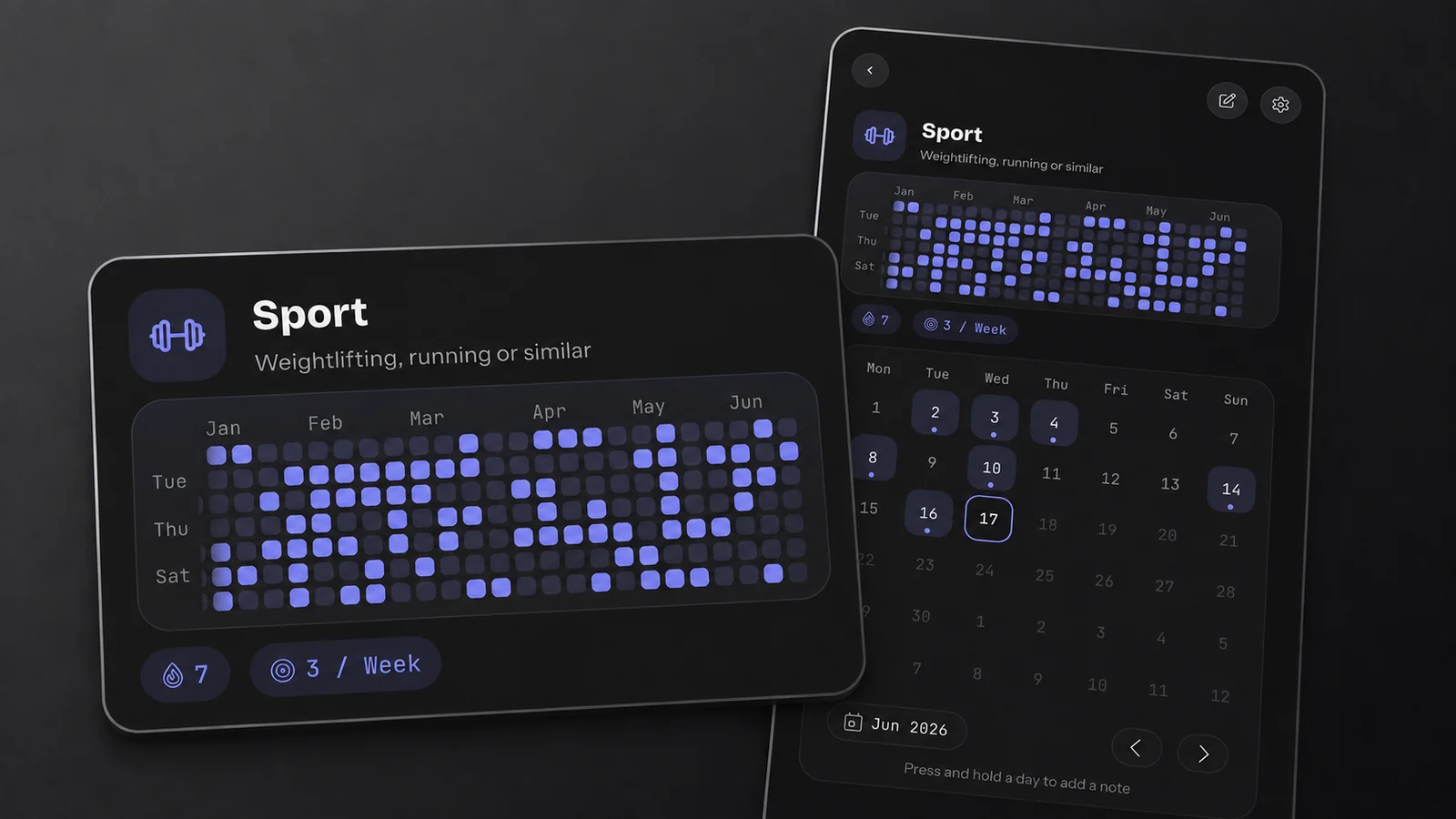
HabitKit's detail view, with demo data: six months of one habit on a single screen, the streak and weekly goal beneath it.
Logging: One Tap, Or No Tap At All
Streaks' best feature is that you may not have to log anything. Connect Apple Health and it completes "walk 5,000 steps" or a workout goal by itself. For fitness habits that removes the most common way a tracker fails: forgetting to tap.
HabitKit is manual by design. One tap completes a Yes / No habit, each tap adds one to a Count, and a Measure habit takes an amount in your own unit, such as litres, pages or minutes. On iPhone, seven Shortcuts actions let Siri or an automation log for you, which covers some of the same ground, for example completing "Sport" when a workout ends (how to set that up). There is no Health integration.
If your habits are things a sensor can see, Streaks wins this one. If they are things only you can see, like reading, stretching or not snacking after dinner, it makes no difference.
Platforms: Every Apple Device, Or iPhone And Android
Streaks covers the whole Apple family, with a Watch app, complications and iCloud sync between them. It does not exist on Android, so a move to an Android phone means starting again somewhere else.
HabitKit runs on iPhone and Android as the same app, and a free export file moves your history from one to the other in either direction (moving to a new phone). It has no Watch, iPad or Mac app and no automatic sync.
Price: Pay Once, Or Start Free
Streaks is one of the cleanest deals in the category: $5.99 once, one purchase for every Apple device, no subscription and no upsell.
HabitKit is free for four habits with no time limit, including notes, categories, quit habits, a reminder per habit, automatic backups and export. Pro adds unlimited habits, widgets, charts and up to three reminders per habit, as a monthly or yearly subscription or a one-time Lifetime purchase (what Pro unlocks). If you only ever need four habits, HabitKit costs nothing. If you need widgets and more habits, Streaks is the cheaper one.
Your Data
Neither app needs an account. Streaks keeps your data on your devices and in your iCloud. HabitKit keeps it on your phone, with seven daily backups stored next to it and, on iPhone, a daily backup in your own iCloud.
The App Store privacy labels differ, and Streaks' is the leaner one. Streaks lists only diagnostics, not linked to you. HabitKit lists purchases as linked to you, and some usage, diagnostics and approximate location data as not linked. Neither label lists anything used to track you across other companies' apps.
Where Streaks Is Better
- Apple Health completes habits without a tap.
- A real Apple Watch app, plus iPad, Mac and Vision Pro, all synced through iCloud.
- One small payment covers everything, forever.
- A leaner privacy label.
Where HabitKit Is Better
- Months of a habit's history are visible at once, and a broken streak doesn't wipe the picture.
- It runs on Android as well as iPhone.
- Four habits are free for good, so you can try it without paying.
- Amounts in your own unit fill a day partially, and quit habits can have a daily limit instead of all or nothing.
- No cap on the number of habits once you have Pro.
Switching From Streaks
There is no importer. HabitKit reads only its own backup format, so you would create your habits again and fill in recent days from each habit's calendar (fixing a past day). Some people keep both: Streaks for the habits Apple Health can see, HabitKit for the ones only they can.
Common Questions
Is Streaks A One-Time Purchase?
Yes. It is $5.99 on the US App Store with no in-app purchases, and one purchase covers iPhone, iPad, Mac, Apple Watch and Vision Pro.
Is Streaks Available On Android?
No. Streaks is Apple only. HabitKit runs on iPhone and Android.
Does HabitKit Have An Apple Watch App?
No. There is no Watch app, and no iPad or Mac app either.
Which One Is Better For Quitting A Habit?
Both work. Streaks counts the days since you last did the thing. HabitKit does the same with a quit habit, and a Count or Measure quit habit can set a Stay Below limit, so "under two coffees" can be the goal instead of none at all (tracking a habit you want to quit).
Sources
Checked on the date at the top of this page. Streaks is a trademark of its developer; HabitKit is not affiliated with it.