
Set A Reminder For A Habit
By Sebastian Röhl, creator of HabitKit
5 min read Published Updated Instructions for HabitKit 1.18.0
Per-habit reminders live in the habit editor under Reminder. One reminder is a set of weekdays plus one time. Free gives you one reminder per habit. HabitKit Pro raises that to three.
If you want a single nudge that covers everything instead, skip to the daily check-in at the bottom of this page. That one is free.
On this page
Add A Reminder
- Open the habit for editing, or create it.
- Tap Reminder below the tracking controls. It shows how many you already have, followed by "Active Reminders".
- Tap Add Reminder. Before you add anything, the page shows "No Reminders" and the line "Add a reminder to your habit for daily notifications."
- Set the weekdays and the time on the card that appears.
- Go back, then save the habit.
Check the weekdays and time before saving. A new reminder starts on weekdays with a suggested time, which you can change to the minute.
On the free tier, Add Reminder opens the Pro screen once you already have one reminder. Extra reminders left from an earlier subscription or backup remain saved but are not delivered without Pro. See what HabitKit Pro unlocks.
For a habit you are trying to quit, the reminder still works, but it fires on a different logic. Track a bad habit you want to quit covers that.
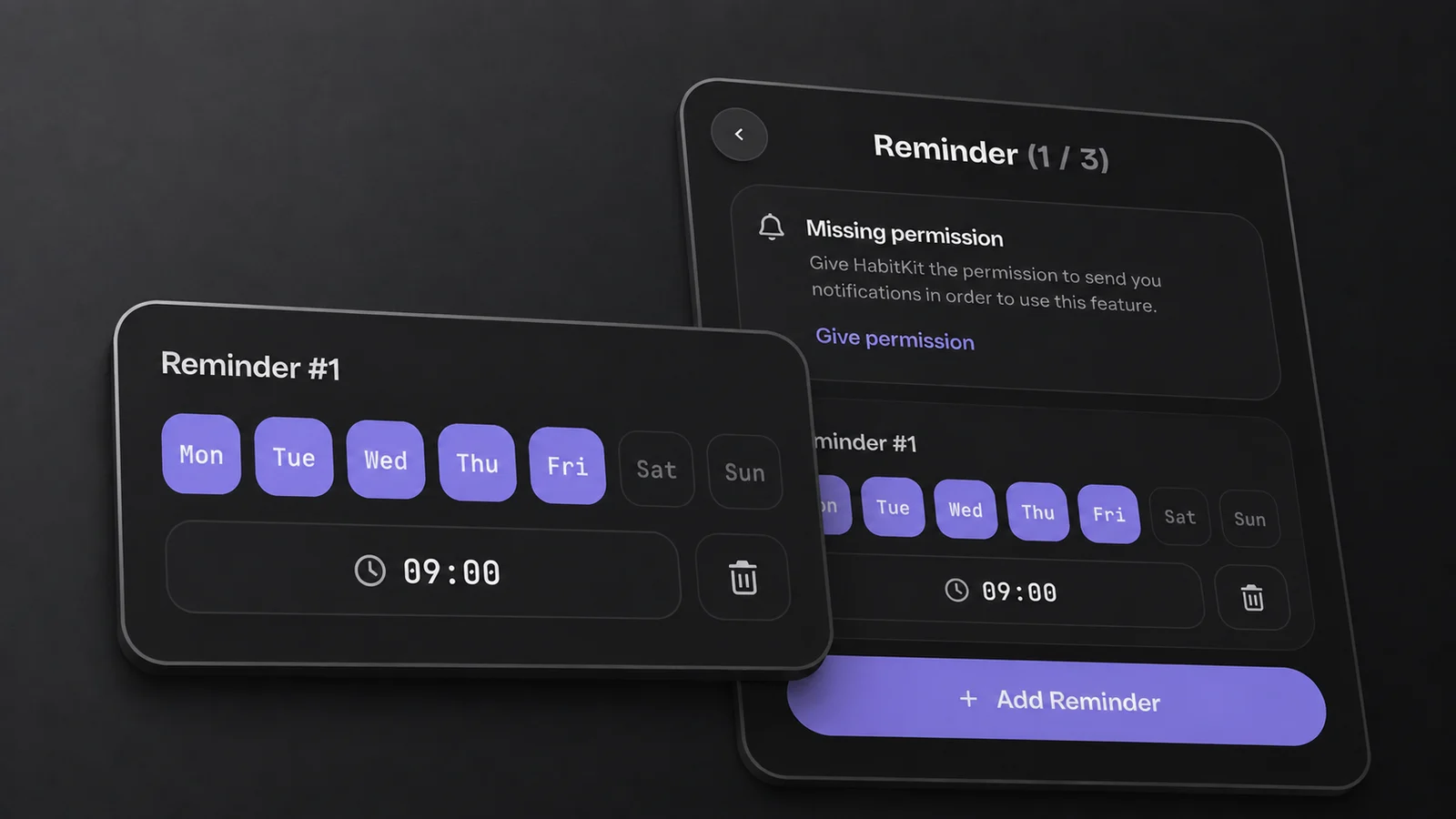
This demo reminder is set for weekdays at 09:00. The notice above it means notification permission is still needed.
Give HabitKit Permission To Notify You
HabitKit requests notification permission when you open reminder settings. You can also encounter the request while setting up the daily check-in.
If permission was already denied, the reminder page shows a card titled "Missing permission", with the line "Give HabitKit the permission to send you notifications in order to use this feature." and a "Give permission" button.
Depending on the Android version, check these two permissions:
- Notifications, the usual permission.
- Alarms & reminders, in the Android system settings for HabitKit. Every reminder is scheduled as an exact alarm that is allowed to fire while the phone is dozing, which is what keeps them punctual. Without that permission they cannot be scheduled that way.
If reminders are set up correctly and still arrive late or not at all, that has its own article: reminder notifications arrive late or not at all.
What The Notification Says
The title is the habit's name. The body depends on the habit type:
- Build a habit: "It's time to add a completion to" followed by the habit name.
- Quit a habit: "Stay on track today".
Android notifications carry a button. It says "Complete" on a habit you are building, or "I slipped" on one you are quitting, and it records an entry without opening the app. For a numeric habit, the action adds one unit. On a quit habit with a Stay Below, that does not necessarily mean the day has reached the maximum. Open the app when you need to enter a precise measured amount. iOS notifications carry no buttons at all. That is a platform difference in HabitKit, not something broken on your phone, and not something a setting can turn on.
Tapping the notification body itself does the same thing on both platforms: it opens the app at the overview, not at the habit that sent it. There is no deep link to the habit.
Per-habit reminders stay quiet after today's target is reached. For build habits, that means the daily goal is complete. A Yes / No quit habit stays quiet after a slip; a Count or Measure quit habit stays quiet once its Stay Below is reached. While a quit habit remains clean or below its maximum, reminders can still arrive.
One Daily Check-In For All Your Habits
If per-habit reminders are more than you want, there is a single daily nudge at Settings › Daily Check-In Reminders, described in the app as "Set up a daily notification to remind you to complete your habits."
It gives you weekday chips, one time, and two optional text fields: "Custom Notification Title" and "Custom Notification Message". Leave the title blank and the notification is titled "HabitKit". Leave the message blank and it reads "Don't forget to complete your habits today!". The default schedule is Monday through Friday at 18:00.
This one is free. It follows its own schedule and can still notify you after all your habits are complete.
Related Questions
How Many Reminders Can One Habit Have?
One on the free tier and up to three with HabitKit Pro. The reminder page title shows which you are on, as "Reminder (1 / 1)" or "Reminder (1 / 3)".
Can A Habit Remind Me More Than Once A Day?
Not from a single reminder, because one reminder is a set of weekdays plus one time. With Pro you can add a second and third reminder at different times to the same habit.
Why Did My Reminder Not Fire On A Day I Had Already Ticked?
Per-habit reminders skip today once the daily goal is reached. Quit-habit reminders stop after a Yes / No slip or once a numeric Stay Below is reached. The separate daily check-in still follows its schedule even when all habits are complete.