
Take A Day Off Without Breaking Your Streak
By Sebastian Röhl, creator of HabitKit
6 min read Published Updated Instructions for HabitKit 1.19.0
HabitKit has no streak freeze and no way to excuse a day after it has passed. For a build habit on Every day, an unfinished day breaks the streak once that day ends.
Days off are planned ahead instead, with Repeat in the habit editor. Choose On specific days and the days you leave out become free days, which never break the streak. For days off that move around, use Times a week, Times a month or Every few days.
On this page
There Is No Streak Freeze
No feature anywhere in the app marks a day as skipped after the fact, banks a rest day, or forgives a miss. There is no setting for it and no hidden gesture that does it.
If you did the habit but forgot to log it, you can correct the past entry. That records what happened rather than excusing a missed goal. To plan a day off, change the schedule ahead of time.
Pick The Days With On Specific Days
For a habit that belongs to fixed days, such as weekdays only:
- Open the habit and tap Edit.
- Under Repeat, tap the card to open Goal & Streak.
- Tap On specific days. Under Which days, tap the days you want, or use Weekdays or Weekends.
- Go back to the edit screen and tap Save.
The Repeat card then names the days, such as Mon–Fri. The days you left out are free days. In the app's words: "they never break it and never lower your consistency." A free day shows a small grey dot instead of an empty square, on the habit's grid, in the overview and on home screen widgets.
Reminders skip free days on their own, even when a reminder includes that weekday. Set a reminder for a habit shows how the reminder page marks them.
Did it on a free day anyway? The day still fills its tile, but the streak counts only the days you picked.
Leave The Days Open With A Weekly Goal
For days off that move around, set a weekly target below seven. Each qualifying day must meet its daily target, whether that is one Yes / No check or a Count or Measure goal.
- Open the habit and tap Edit.
- Under Repeat, tap the card to open Goal & Streak.
- Choose Times a week and set it to 5 with the plus and minus buttons, shown as 5 / week.
- Go back to the edit screen and tap Save.
The new goal applies from today. Earlier days keep the goals they had before the change; there is no Past Streaks dialog.
Times a month works over a calendar month. A target of 20 means twenty distinct successful days, leaving between eight and eleven days off depending on the month's length.
The current week cannot break the streak while the target is still reachable in the days left. On a Monday-starting week, miss Monday and Tuesday on 5× a week and five days still fit. Once three days have ended without meeting the daily target, that week's goal is out of reach.
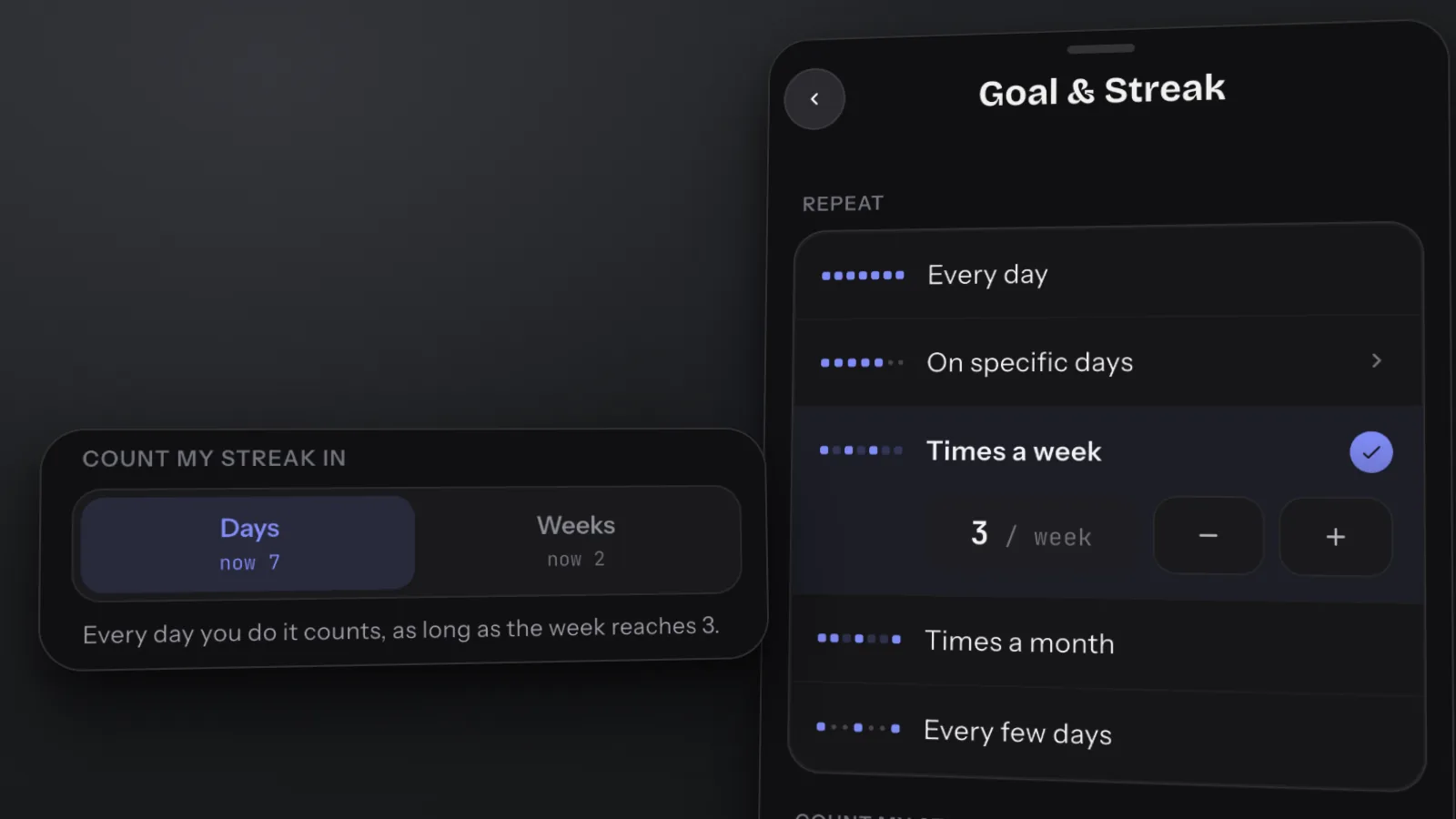
This separate example uses 3 / week, leaving room for four days off each week.
Every Few Days
For a habit you do every second or third day, choose Every few days under Repeat and set the number. On Every 2 days, "You can skip 1 day in between without losing your streak." The days a check-in covers show the free-day dot, and reminders stay quiet on them until the next check-in is due. The streak counts check-ins in a row.
Pausing A Habit For A While
There is no pause setting. Every build habit has a Repeat option, and Every day is the default. Habits that were set to no streak goal in an earlier version now repeat every day.
For a longer break, the closest thing is a looser goal set ahead of time, such as Times a month at a low number. For a habit you want to remove from the overview, use Archive in its menu. Archiving stops reminders and keeps the history, but does not change how the habit repeats or guarantee that the streak survives the time away. Find it under Settings › Archived Habits; restoring it requires Pro. Permanent deletion is a separate action. See automatic backups and recovery before relying on a backup to recover deleted data.
What A Broken Streak Costs
Less than it feels like, which is worth saying plainly.
- Nothing is deleted. Every completion you logged is still stored, and the grid still fills every tile you earned. A broken streak changes one number, not your history.
- Your best run is not erased. The charts page shows Best Streak next to Current Streak, so the long run you had is still on the record. Charts & Statistics is a Pro feature, and Best Streak there is the habit's longest run of all time, in the unit its streak counts.
- The grid is the better picture anyway. Ten months of dense tiles with a gap in them looks like what it is, which is ten months of a habit. The streak counter cannot show you that.
If the number matters more to you than the record it stands for, two guides are worth ten minutes: a streak is not a consistency score, and what one missed day does to a habit, which is the research on what a single miss actually costs. The short version is less than you fear.
Related Questions
Does HabitKit Have A Streak Freeze Or Skip Day?
There is no freeze or skip-day feature that excuses a day afterwards. Plan days off ahead instead: pick the habit's days with On specific days, or choose Times a week, Times a month or Every few days. Days off planned that way never break the streak.
Can I Choose Which Weekdays Count Towards My Streak?
Yes. Under Repeat, choose On specific days and pick the days. The other days are free days: they never break the streak, they show a small dot on the grid, and reminders skip them.
Does Archiving A Habit Delete Its History?
No. Archiving hides the habit and stops its reminders while keeping every completion. Restoring an archived habit needs Pro. Deleting one permanently is a separate action in the same list.