
No 02 · Guide
HabitKit On iPhone Duo: What's New In Every Pose
By Sebastian Röhl, creator of HabitKit
8 min read Published
HabitKit is laid out for iPhone Duo from version 1.19.2, in every pose. Closed, the buttons step aside so your habits keep the full height of the outer display. Half open, nothing lands on the fold: sheets and dialogs open beside it. Fully open, your habits sit in two columns and a habit's history, calendar and notes sit side by side. There is nothing to switch on, and folding or unfolding keeps you where you were.
A habit tracker is a good test of a folding phone, because the whole point of HabitKit is a picture: every habit is a grid with one tile per day, and a bigger screen means more of your year at a glance. So instead of stretching the phone app across a wider screen, we laid out each display on its own. Here is what that looks like, pose by pose, and what else is new in 1.19.2. If you just want the short version and the film, the habit tracker for iPhone Duo page has it.
On this page

What's New On iPhone Duo At A Glance
- Closed: the buttons move into a side column next to the status bar, so the habit list runs the full height of the outer display.
- Half open: HabitKit knows where the fold is. Sheets and dialogs open on one side of it, and Settings and the habit editor give each side its own pane.
- Fully open: two columns of habits meet at the crease, and a habit's page shows its history, calendar and notes side by side.
- Folding and unfolding: you stay on the same screen, with no stretched frame in between.
- Every language: right-to-left languages like Arabic mirror correctly across the fold.
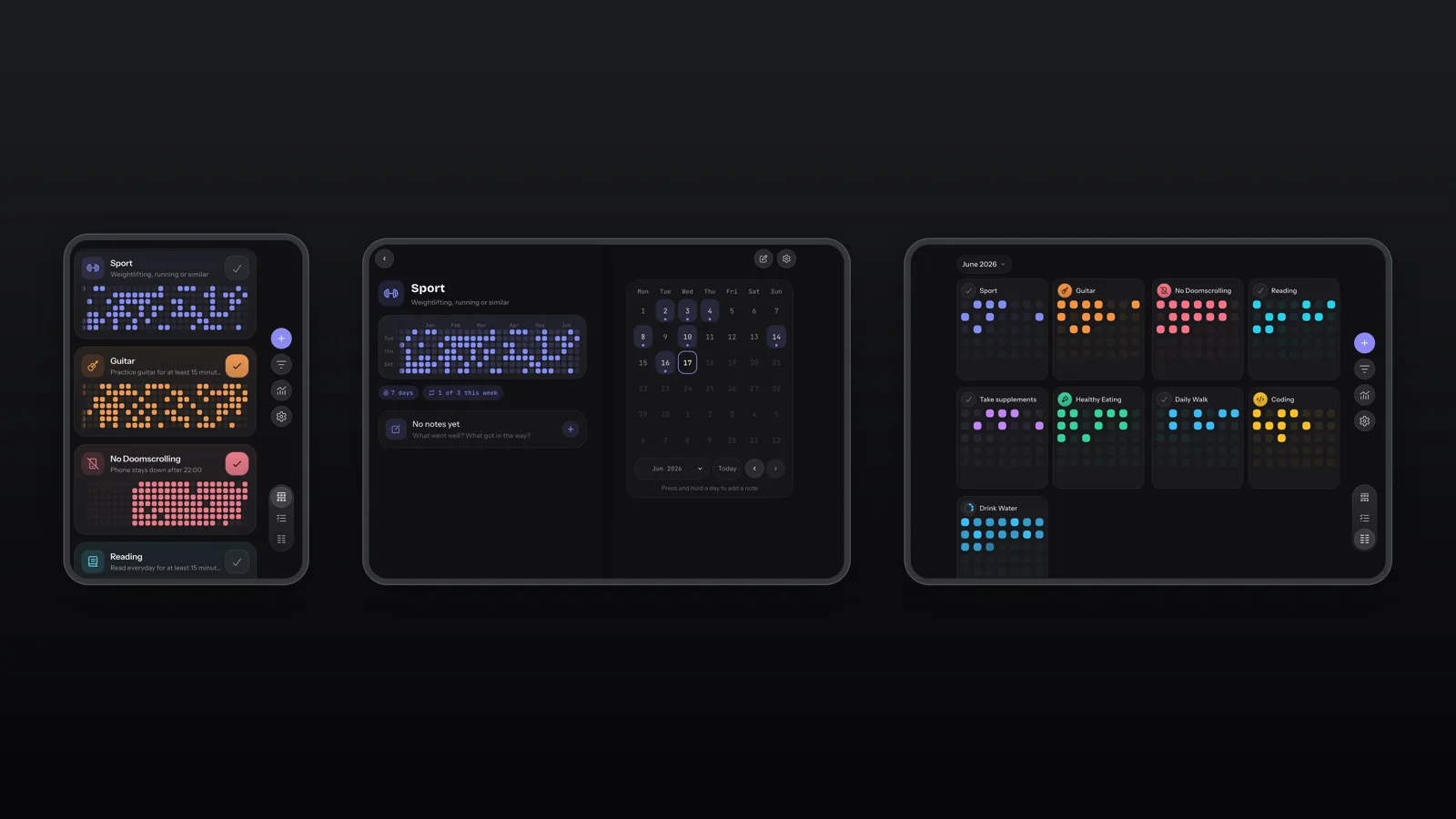
Real screenshots of HabitKit 1.19.2 on iPhone Duo, closed, half open and fully open. The habits and their history are demo data.
Closed: The Outer Display
The outer display is where most quick check-ins happen, so it keeps the layout people already know from HabitKit on any iPhone: a list of habits, each with its grid and a check button. What changes is where the buttons go. On the closed iPhone Duo the system reserves a column beside the screen, and HabitKit moves New habit, Filters, Charts and Settings into it, with the view modes underneath. Nothing sits above the list any more, so your habits start at the top of the screen.
The rest of the app comes with it. A habit's page, its calendar and the editor all fit the outer display, including the Goal & Streak page where you choose how often a habit repeats.
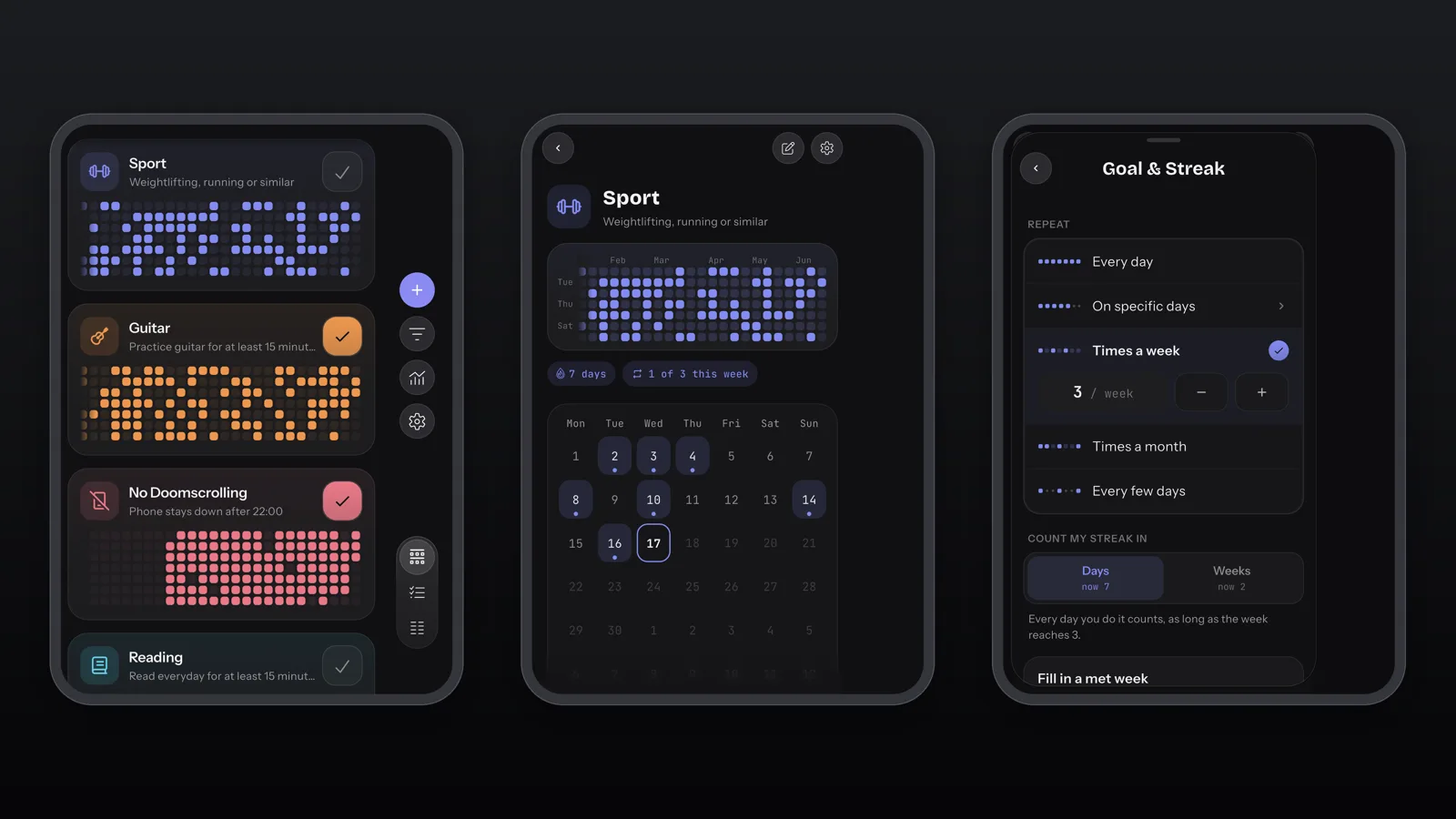
The outer display: the habit list, a habit's page and Goal & Streak (demo habits).
Half Open: Nothing Lies Across The Fold
Half open, iPhone Duo stands like a small book, and the fold runs down the middle of the screen. An app that ignores it ends up with a button or a line of text bent across the crease. HabitKit reads where the fold is and lays the screen out around it.
Open a habit and its page becomes a spread: the year grid on one side, the calendar on the other. Tap a day and its sheet opens on the calendar's side, beside the fold rather than across it, so you can add a note to yesterday while the year stays in view. Dialogs do the same. Settings and the habit editor give each side of the fold its own pane, and the Month view lines your habits up in columns on either side of it, a whole month at a glance.
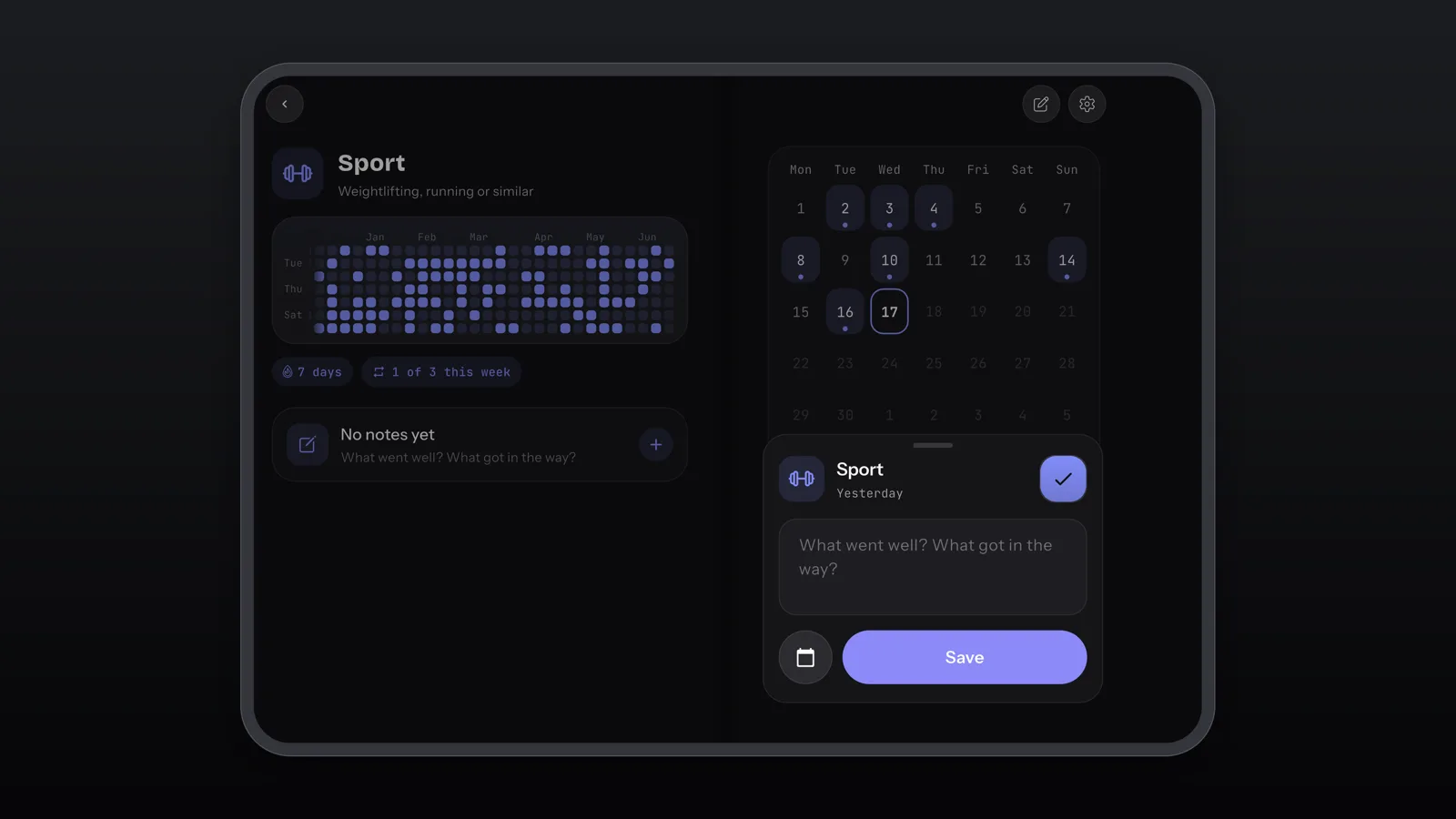
Half open: the year on the left, and the sheet for a day opening on the right, clear of the fold (demo habit).
Fully Open: Two Columns And A Side-By-Side Habit Page
Fully open, the inner display is far wider than a phone screen, and a single column of habit cards would leave most of it empty. So the overview puts your habits in two columns that meet at the crease, never with a card sitting across it. A whole morning routine fits on one screen, and you can check off half a dozen habits without scrolling. The buttons and view modes stay in the side column, the same place they were on the outer display.
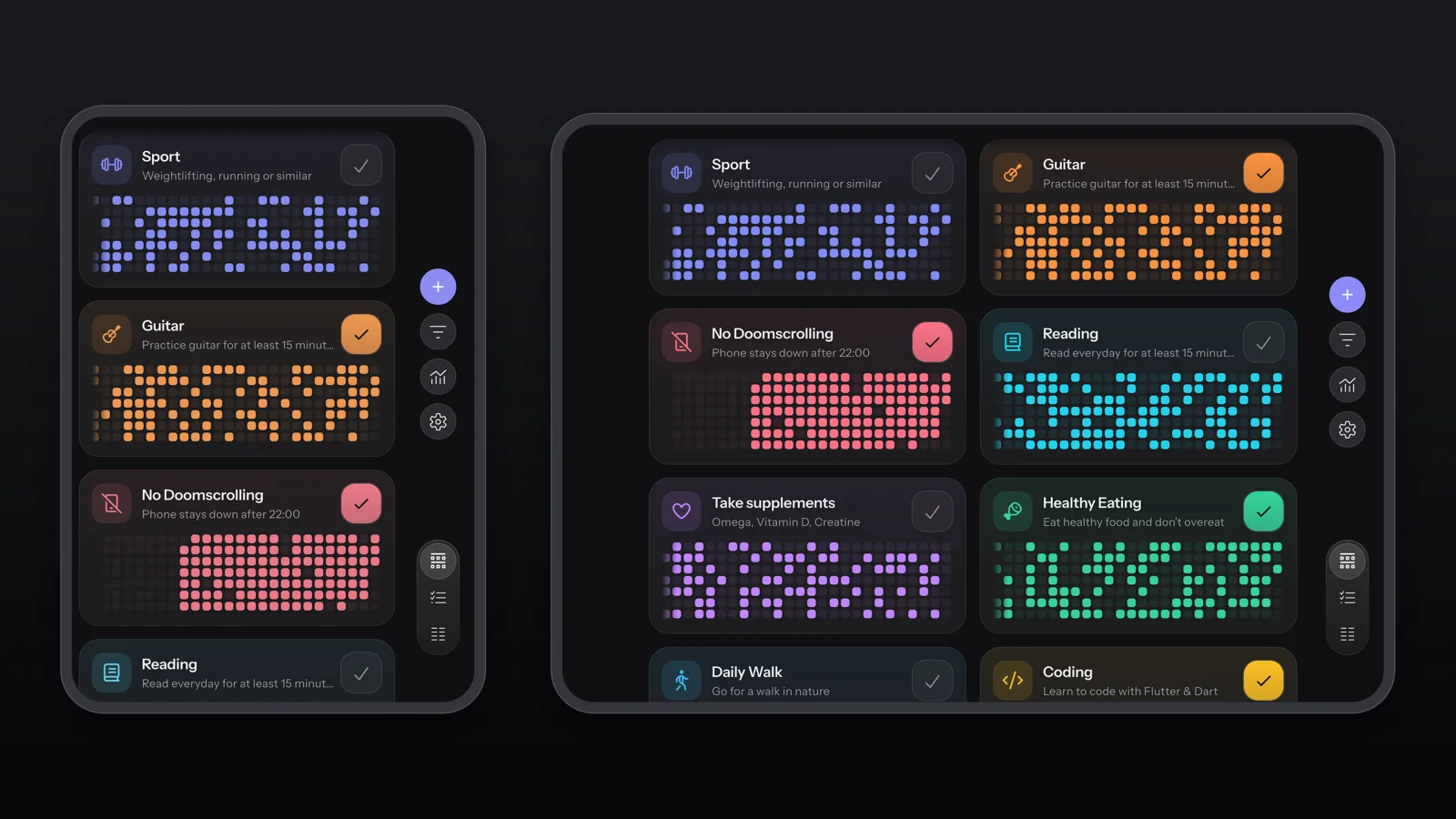
The same habits closed (left) and fully open (right), at their true relative size (demo data).
A habit's page uses the width too. The year grid runs across the top, and below it the calendar and your notes sit side by side, so you can read what you wrote about a week while you look at it. Settings opens as a split view, and the pages inside the habit editor, like Categories, Goal & Streak and Reminder, open as a card over the editor instead of filling the screen with one narrow column.
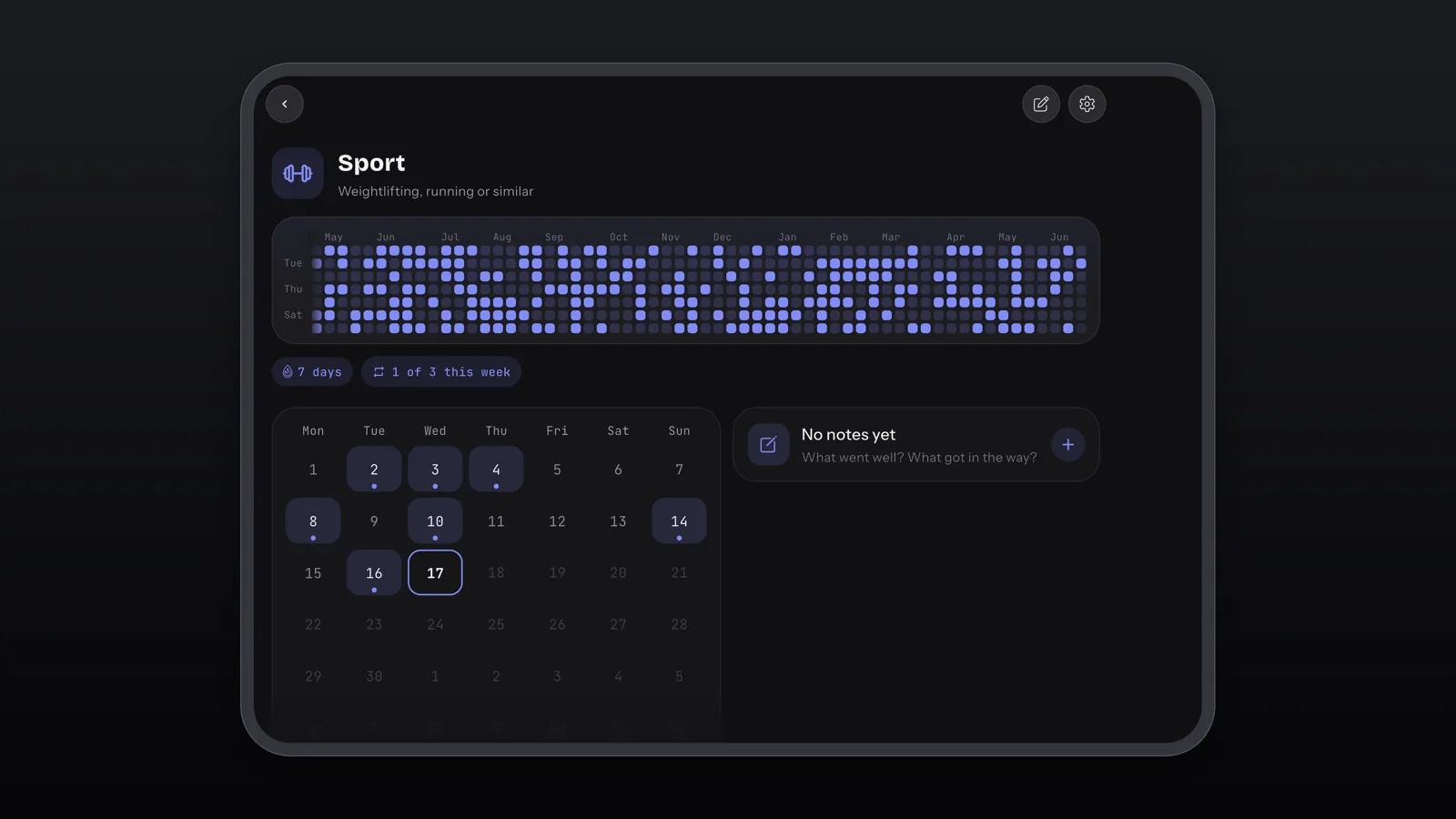
A habit's page fully open: history across the top, calendar and notes side by side (demo habit).
Fold And Unfold Without Losing Your Place
Folding a phone mid-task is where an app can stumble: the screen jumps back to the start, or a stretched copy of the old layout shows for a beat before the new one appears. HabitKit keeps you on the screen you were on, whether that is the habit list, a habit's page or Settings, and covers the change of size so you never see a stretched frame in between.
Also New In HabitKit 1.19.2
Two more things arrive in the same update, and both work on every iPhone, not just the Duo.
- A "Log habit" control. Add it to Control Center, the Lock Screen or the Action button and point it at one habit. A tap logs a Yes / No habit for today, a count habit set to add one per tap goes up by one, and a habit where you enter a value opens HabitKit ready for the number. It needs iOS 18.2 or later, and it's free.
- A softer look. In the light theme, cards, tiles and the check button carry gentle shadows, and long sheets and lists soften at the bottom edge while there is more to scroll, so you can tell at a glance that a page goes on.
On Android, 1.19.2 brings the softer look and the smaller fixes. iPhone Duo and the Log habit control are iPhone features.
How To Get HabitKit On iPhone Duo
If HabitKit is already on your iPhone Duo, update it to version 1.19.2 or later from the App Store. There is no setting to change: HabitKit picks the right layout each time you fold or unfold.
If you are new to HabitKit, it is free to download, needs no account and keeps your habits on your phone. Create your first habit in a minute, then read how the grid works to see why a bigger screen suits it.
If you are moving to an iPhone Duo from another phone, your habits come with you. Moving your habits to a new phone covers restoring your iCloud backup from another iPhone, or importing an export file if you are coming from Android. App settings and widgets are set up again on the new phone.
Frequently Asked Questions
Which Version Of HabitKit Supports iPhone Duo?
Version 1.19.2 and later. Earlier versions don't have the iPhone Duo layouts, so update from the App Store first.
Does The iPhone Duo Layout Cost Extra?
No. Every pose works the same way whether you use HabitKit free or with Pro. Pro unlocks the same things as on any phone, such as unlimited habits, widgets and charts (what Pro unlocks).
Does Anything Change On Other iPhones?
Not the layout: on other iPhones HabitKit keeps its upright phone layout. The Log habit control and the softer look in 1.19.2 come to every iPhone.
Is HabitKit A Good Habit Tracker For A Foldable Phone?
That is what 1.19.2 was built for. Because HabitKit shows every habit as a grid of days, a wider screen shows more of your history at once, and the two-column overview and side-by-side habit page make use of the space instead of stretching a phone layout to fill it.