
HabitKit Free Vs Pro: Features, Plans And Cancellation
By Sebastian Röhl, creator of HabitKit
8 min read Published Updated Instructions for HabitKit 1.18.0
The free app is a complete habit tracker for up to four habits, for as long as you like, with no trial clock running in the background. Pro removes the habit limit and adds home screen widgets, charts, up to three reminders per habit, the dashboard display options and the compact list settings. Backups, export and import are free for everyone.
It comes as a monthly subscription, an annual subscription, or a one-time Lifetime purchase. All three are bought through Apple or Google. Subscriptions are cancelled through the store as well.
On this page
Compare Free And Pro
| Feature | Free | Pro |
|---|---|---|
| Active habits | Up to four | Unlimited |
| Yes / No, Count and Measure | Included | Included |
| Notes, categories and quit habits | Included | Included |
| Reminders per habit | One | Up to three |
| Daily check-in | Included | Included |
| Home screen widgets | Not included | Included |
| Charts and dashboard customisation | Not included | Included |
| Manual export and import | Included | Included |
| Automatic backups and recovery | Included | Included |
| Daily iCloud backup (iPhone) | Included | Included |
| Archive a habit | Included | Included |
| Restore an archived habit | Not included | Included |
Pro does not add automatic sync, an Apple Watch app or individual quit-habit charts. The same feature set is available through Monthly, Annual and Lifetime; store prices vary by country.
Is HabitKit A Good Fit?
HabitKit suits people who want an offline record of daily actions, counts or measured amounts without creating an account. The free tier is useful if four active habits are enough. Choose Pro if you need widgets, more habits, charts or the extra display options.
If automatic sync across devices is essential, HabitKit does not currently provide it. Moving to a new phone is a restore or a manual transfer, not a shared account.
Comparing it with other apps first? Six habit trackers side by side sets out what each does best and where each falls short, HabitKit included, and HabitKit vs Streaks covers the most common choice on iPhone. Prefer to pay once, or not at all? Habit trackers without a subscription compares the free plans and one-time prices.
What The Free App Does
The free tier includes:
- Up to four habits. There is no time limit.
- All three dashboard views: Card view, Compact view and Month view.
- One reminder per habit, plus Daily Check-In Reminders.
- Day notes, categories, quit habits, share images, themes, and the language picker.
- The automatic daily backups on the phone and, on iPhone, the daily iCloud backup, and restoring either. See automatic backups, and how to restore one.
- Export and import, free since HabitKit 1.18.2. See export and import your habit data.
- Archiving a habit, and deleting an archived habit permanently.
Creating a fifth habit is blocked rather than degraded: the + button opens the Pro screen instead of the habit editor. If you are still setting up, see install HabitKit and create your first habit.
What Pro Adds
Pro includes these features:
- Unlimited number of habits.
- Home Screen Widgets, on both platforms. A widget without Pro shows a padlock rather than a fault. See add a habit tracker widget to your home screen.
- Multiple Reminders, up to three for the same habit instead of one.
- Charts & Statistics.
- Dashboard Customization: Show Streak Count, Show Streak Goal, Show Month Labels, Show Day Labels, Show Categories.
- Compact List settings: choose between 1 and 7 days, and whether habit names are Hidden or Shown. Free is pinned at five days with names shown.
- Restore archived habits. Archiving and permanently deleting stay free; only bringing one back is Pro.
- Support an Indie Developer, which is the last row of the Pro screen and an honest description of the rest of it.
Two things people expect to find here and do not:
The streak number and the streak goal chip on the dashboard cards are off by default, and switching them on is part of Dashboard Customization, so it is Pro. The habit detail page shows both to everyone. If all you want is to see a streak, open the habit.
Quit habits do not appear in the individual habit picker of Charts & Statistics and are excluded from completion totals. Their clean-day streaks still contribute to the all-habits Current Streak and Best Streak figures. Pro does not add individual quit-habit charts. See track a bad habit you want to quit.
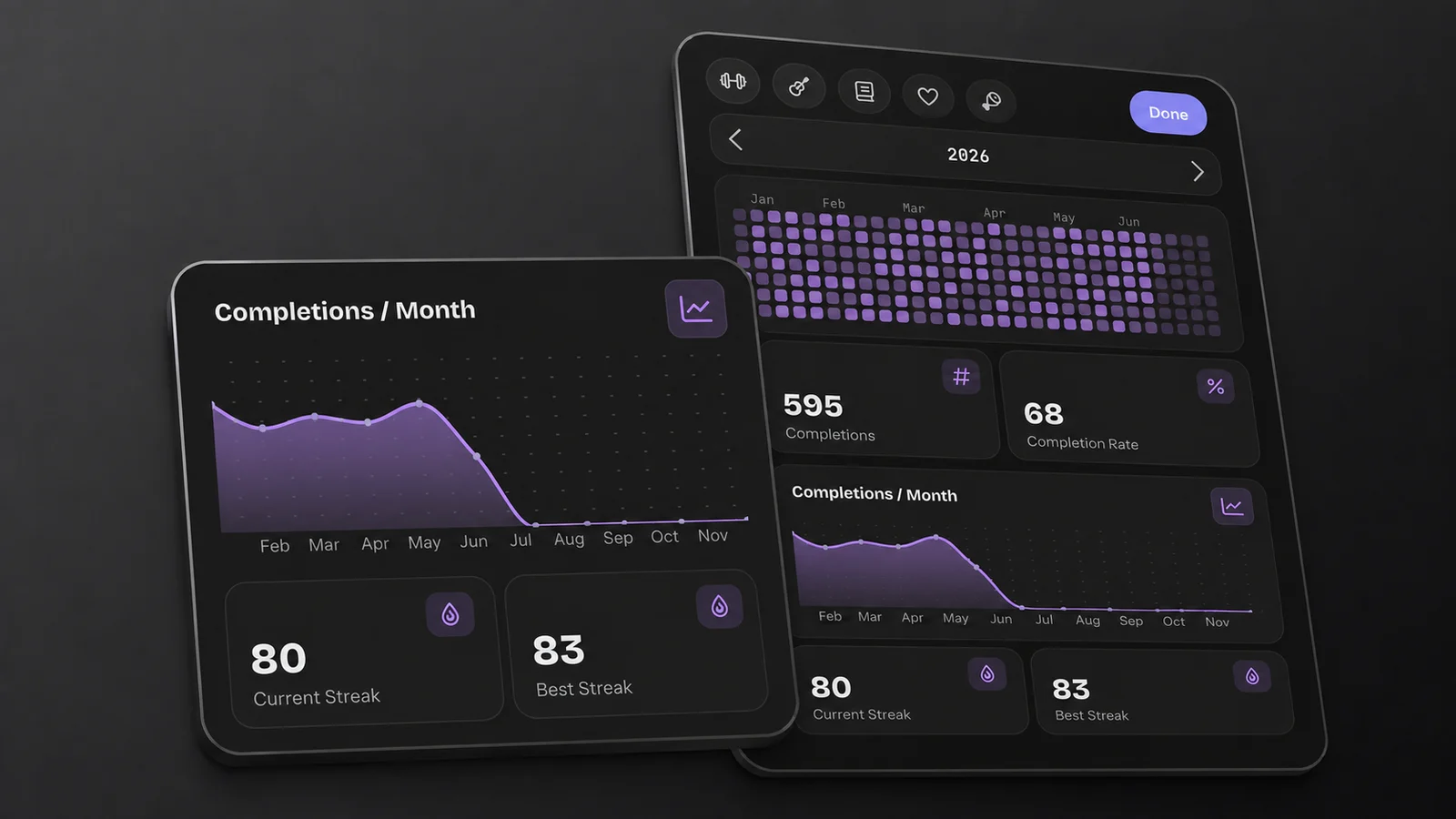
Charts and statistics are part of Pro. This example shows the Tour demo data.
The Three Plans: Monthly, Annual And Lifetime
The Pro screen shows three cards in a fixed order: Lifetime, Annual, Monthly. Annual is pre-selected. The button underneath reads Continue.
- Monthly and Annual are subscriptions. The app shows the billing period and local price; the annual price comparison varies by platform.
- Lifetime is a single purchase: "Pay once. Unlimited access forever."
Prices are set per country and shown on the cards in the app. They come from Apple and Google, and the two stores are not always priced the same, so the number on your device is the number that applies.
The free tier does not expire. Check the plan and price shown by your store before confirming a purchase.
The message Something went wrong. Try again later. in place of the three cards means the store did not answer, or answered with one of the three plans missing. Continue is greyed out when nothing came back at all, and stays tappable when part of it did, so read the card rather than the button. The message does not identify a particular account problem. Try again on a working connection. If it persists, see restore a Pro purchase, which covers the same network causes.
Why The Pro Screen Opens By Itself
It is not random, and it is capped at once per time you open the app. The Pro screen opens on its own in four situations:
- right after first-run onboarding
- right after the What's New sheet following an update, which older Android versions skip
- once after each app update
- on 31 December and 1 January, once a year
Those four open with a close button in the top left rather than a back arrow, which is the way out of them. Anything else that raises the Pro screen is a locked feature you tapped.
Manage, Cancel Or Refund
To stop a subscription renewing, open HabitKit Pro, tap Manage Subscription and cancel through your store. If you cannot open HabitKit, use your Apple or Google account’s subscription settings. Cancellation and a refund are separate requests.
Buying Lifetime does not automatically cancel an existing subscription. Stop its renewal as well.
Once you are Pro, the same screen changes. It includes Manage Subscription and Done, plus upgrade options for eligible subscribers. Manage Subscription hands you to Apple's account subscriptions page on iOS and to Google Play's subscriptions page on Android. Cancelling happens there, not inside HabitKit.
You can buy Lifetime while subscribed. Open the HabitKit Pro screen and choose Get Lifetime instead. Review the price and the One thing before you buy message, then confirm Buy Lifetime. Buying Lifetime does not cancel your existing subscription. Use Stop Subscription after purchase, or Manage Subscription, to stop its renewal and avoid paying twice. Lifetime access remains yours after cancellation.
Eligible monthly subscribers also see Switch to Yearly. That change takes effect at the next renewal; a pending switch displays its start date. If the option is absent, manage the subscription through your store. Lifetime owners do not see these upgrade offers.
Refunds belong to Apple and Google rather than to HabitKit. Both flows are linked from the FAQ on the help center's front page.
Archiving keeps every completion, note and setting. Resubscribing unlocks Pro again; archived habits can then be restored from Archived Habits. See automatic backups, and how to restore one for what archiving does and where the archive lives.
Related Questions
Does HabitKit Pro Have A Free Trial?
You can use the free tier for up to four habits without a time limit or subscription. For any Pro purchase, check the price, billing period and any offer displayed by your store before confirming.
Can I Upgrade From A Subscription To Lifetime In The App?
Yes. Open HabitKit Pro and choose Get Lifetime instead. Buying Lifetime does not stop the existing subscription, so cancel its renewal through Stop Subscription or Manage Subscription afterwards. Your habits and history are not affected.
What Happens To My Habits If Pro Lapses?
Nothing is deleted. Every habit past the fourth is locked and blurred until you resubscribe or archive down to four. Archiving is free and keeps all of that habit's history, and you can restore an archived habit later once you have Pro again.