No 22 · Comparison
GitHub-Style Habit Trackers: Why The Grid Works
By Sebastian Röhl, creator of HabitKit
22 min read Published
A GitHub-style habit tracker turns each habit into a calendar heatmap: columns are weeks, rows are weekdays, and every completed day fills one small square. The idea comes straight from the green contribution graph GitHub launched on developer profiles in January 2013, and it solves the oldest flaw in habit tracking. When you miss a single day on a streak counter, months of effort collapse to zero. On a contribution grid, a missed day is one empty square sitting inside a solid block of colour.
If you want that grid to be the main screen of your tracker, HabitKit is built around it from the first tap. If you want a heatmap synced across phone, watch, Mac and web, Habitify goes furthest. On Android for free, Loop Habit Tracker gives you a scrolling history grid with no ads and no account. If your habits belong inside a to-do list, TickTick adds a yearly Habit Heat Map beside your tasks, and if you want to colour the year by mood alongside your habits, Daylio does it with Year in Pixels.
Full disclosure: HabitKit is our app, and we put it first because it is the one we would pick. Every app here gets the same treatment anyway: real strengths, real weaknesses and facts dated to the day we checked them. There are no affiliate links, and no app paid to be on this list.
-
 HabitKit · Best Overall
Every habit is a GitHub-style tile grid on the main screen, with five partial shades and home screen grid widgets.
4.8/5 from HabitKit's editors
-
 Habitify · Best For Cross-Platform Sync
Consistency heatmaps and a 216-day heatmap widget, synced across phone, watch, Mac and web.
4.4/5 from HabitKit's editors
-
 Loop Habit Tracker · Best Free Grid On Android
Free, open-source Android tracker with a scrolling weekday-by-week history grid, frequency chart and habit score.
4.3/5 from HabitKit's editors
-
 TickTick · Best For Tasks And Habits Together
A yearly Habit Heat Map and monthly heatmap widget built into a full to-do list and calendar app.
4.0/5 from HabitKit's editors
-
 Daylio · Best For A Year In Pixels
Colours every day of the year by mood, with activities and goals layered on top and no account.
3.8/5 from HabitKit's editors
Written by the maker of HabitKit, who wants you in the app that suits you. The stars are our own editorial rating out of five, not store ratings. Habitify, Loop Habit Tracker, TickTick and Daylio are named for comparison only; HabitKit is not affiliated with their makers. Prices and features come from the US App Store, Google Play and each developer's own site on the date above.
On this page
Why A GitHub-Style Contribution Grid Works
Three years after launching its contribution graph in January 2013, GitHub made a revealing change. In May 2016, it removed the streak counters from user profiles altogether. As GitHub explained in its announcement, "the simplified interface focuses on the work you're doing rather than the duration of your activity." The grid stayed; the brittle streak number went.
That product lesson lines up closely with what behavioural research finds about tracking habits:
- Visible, physically recorded logs move behaviour. In a meta-analysis of 138 randomised studies covering 19,951 participants, Benjamin Harkin and colleagues (2016) found that monitoring goal progress significantly promoted goal attainment (d+ = 0.40), with larger effects when progress was physically recorded rather than kept in your head. Turning a whole year into a single visual grid makes that record impossible to misread.
- How a log displays a miss changes what you do next. In seven studies published in the Journal of Consumer Research, Jackie Silverman and Alixandra Barasch (2023) found that displaying a broken streak reduced subsequent engagement compared with displaying an intact one, regardless of how much the person had actually done. In the authors' words, the effect "depends solely on how that behavior is represented within the log."
- One missed day does not undo a habit. In Phillippa Lally and colleagues' (2010) longitudinal habit-formation study, missing a single opportunity did not materially affect the habit-formation process. A streak counter obscures that by dropping straight to zero; a year-long heatmap tells the truth by showing one gap among dozens of filled tiles.
Illustrative demo data. One year of a habit fits in a single scan: columns are weeks, rows are weekdays, and today sits in the last column with future days left faint.
Put the same habit on a streak counter and on a tile grid, then skip one Tuesday after a 41-day run. By Thursday, a streak counter reads 2 days, indistinguishable from a habit you started forty-eight hours ago. On a contribution grid, all 41 earlier days stay right where you left them, and Wednesday and Thursday light up immediately beside the single gap.
Illustrative demo data. The same missed Tuesday produces two completely different stories on Thursday depending on how the log displays your history.
That difference is why our essay on habit streaks vs consistency recommends reading the grid before the streak, and why what one missed day does to a habit matters far less than a reset counter makes it feel.
Quick Comparison
| App | Where the grid lives | Tile shading | Home screen heatmap widget | Free plan | Our rating |
|---|---|---|---|---|---|
| 1. HabitKit | Main screen, one card per habit | 5 partial shades for Count & Measure | Yes, with Pro | Four habits, no time limit | 4.8/5 |
| 2. Habitify | Habit progress tab & widgets | Daily completion-rate shades | Yes, up to 216 days | Three active habits | 4.4/5 |
| 3. Loop Habit Tracker | Habit detail History & Frequency | Binary & measurable values | Yes, History & Frequency free | Unlimited, free & open source | 4.3/5 |
| 4. TickTick | Habit detail & widget | Binary check-ins | Yes, monthly heat map (full set Premium) | Five habits, basic widgets | 4.0/5 |
| 5. Daylio | Year in Pixels screen | 5 mood colours | Calendar & quick-log widgets (no pixel grid) | Unlimited diary, ads on Android | 3.8/5 |
"Our rating" is our own judgment against the criteria below, not a store rating. Store ratings are listed in each app's section.
Heatmap Features Compared
| HabitKit | Habitify | Loop | TickTick | Daylio | |
|---|---|---|---|---|---|
| Grid on the main dashboard | Yes | No, today list first | No, tap a habit | No, tasks & today list | No, diary feed first |
| iPhone | Yes | Yes | No | Yes | Yes |
| Android | Yes | Yes | Yes | Yes | Yes |
| Web or desktop | No | Yes | No | Yes | No |
| Partial progress shading | Yes, 5 shades | Overall daily rate only | No, measurable values | Not listed | Mood colours only |
| Works without an account | Yes | Guest on one device | Yes | Not checked | Yes |
| Share grid as an image | Yes, free | Not listed | Not listed | Not listed | Not listed |
| One-time purchase | Yes, Lifetime | Yes, $119.99 | Free, open source | No | Not confirmed |
"Not listed" means the developer's store listing and help pages don't mention it; "Not checked" means we couldn't verify it on the date at the top; "Not confirmed" means we couldn't confirm a fixed one-time option on the date at the top.
How We Evaluated
Not every app with a calendar tab is a real GitHub-style habit tracker. We weighted five things in this order:
- Is the heatmap front and centre? A contribution grid changes your behaviour only when you actually see it. Seeing months of every habit on launch beats hiding a heatmap three taps deep.
- Does it handle partial progress and missed days honestly? Real habits are rarely just binary yes/no. Partial shades for counts or amounts, and a visual layout that treats one missed day as a single gap, matter more than flashy charts.
- Home screen widgets. Putting the grid on your home screen turns every phone unlock into a quiet cue.
- Platforms and friction. One-tap logging, fast launch, and whether the app runs on both iPhone and Android or across desktop and web.
- Price and data ownership. A fair free tier, transparent pricing, whether an account is forced, and whether you can export your history.
Every fact on this page comes from the app's US App Store or Google Play listing, its developer's website, help center or source code, checked on the date at the top.
The 5 Best GitHub-Style Habit Trackers
HabitKitNo 01 · Best Overall
Illustrative demo data. HabitKit draws every habit as a tile grid on the main screen, with five partial shades for Count and Measure habits and clean-day shading for Quit habits.
HabitKit was built from day one around the GitHub-style tile grid. Open the app and every habit is already a card filled with months of coloured squares, with no dashboard tabs to click through first. One reviewer on the App Store put it plainly: "Didn't know I needed a habit tracker with GitHub like heat map."
Where HabitKit pushes the contribution grid further than a simple green-or-grey chart is shading. A Yes / No habit fills a square in full colour with one tap. A Count or Measure habit (pages read, litres of water, minutes practised) fills today's square through five progressive partial shades, growing stronger at 20%, 40%, 60% and 80% before hitting full colour at 100%, so a half-finished evening still registers honestly on the grid (how the grid works). A Quit habit reverses the shading so clean days fill automatically and slips stay empty, or dims progressively under a Stay Below daily cap (tracking a habit you want to quit).
You can choose any start day for your week (Settings › General › Week Starts On), turn on Highlight current day to outline today's tile, share any habit's grid as a Light or Dark PNG for free, and put single-habit grids or multi-habit compact lists right on your home screen with Pro.
What it does well
- The grid is the main screen. Months of every habit appear immediately on launch, with one tap to log from the card itself.
- Five partial shades for Count and Measure habits, plus Quit habits with clean-day shading and Stay Below limits.
- Interactive home screen widgets on iPhone (iOS 17+) and Android with Pro: tick today from a single-habit grid widget, or log today and editable past days from a Compact Habit List (adding a widget).
- No account and free export. Seven daily on-device backups, a daily backup to your own iCloud (iPhone) or Google Drive once you turn it on (Android), and a single file to move between iPhone and Android.
Where it falls short
- No web, Mac or Apple Watch app, and no live multi-device sync between two phones.
- Home screen widgets and a fifth habit need Pro. The free version covers four habits for good, with no trial clock.
- No Apple Health auto-logging, though iPhone users can automate check-ins with ten Siri and Shortcuts actions (Siri and Shortcuts).
- Pricing
- Free for four habits. Pro adds unlimited habits, home screen widgets, charts and extra reminders, as a monthly or yearly subscription or a one-time Lifetime purchase; prices vary by country and are shown in the app (what Pro unlocks).
- Platforms
- iPhone and Android.
- Ratings
- 4.8 from 2,622 ratings on the US App Store, 4.5 from more than 12,000 reviews on Google Play.
HabitifyNo 02 · Best For Cross-Platform Sync
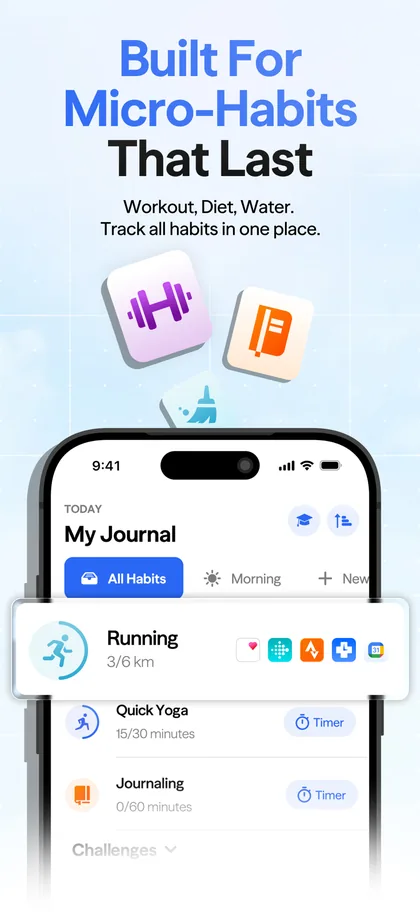
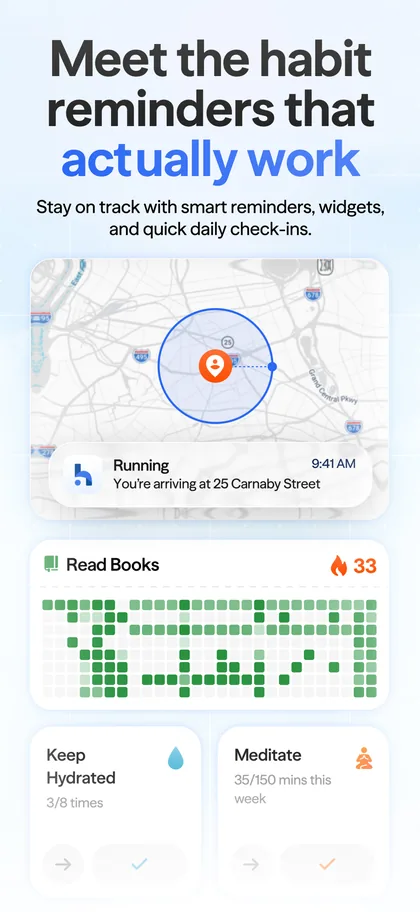
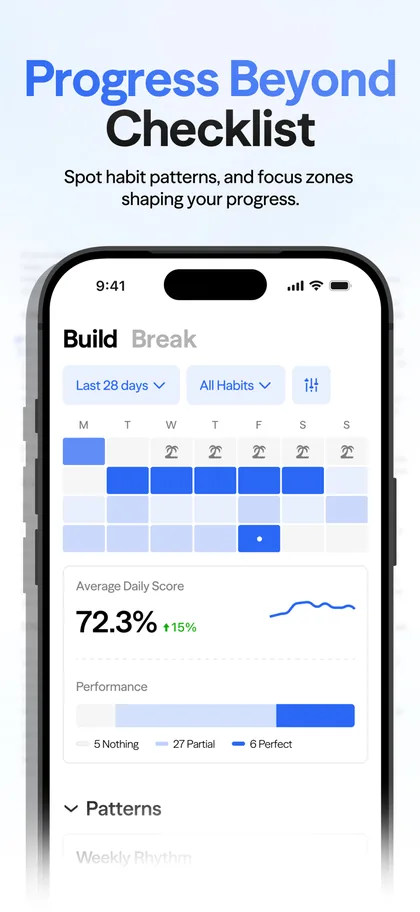
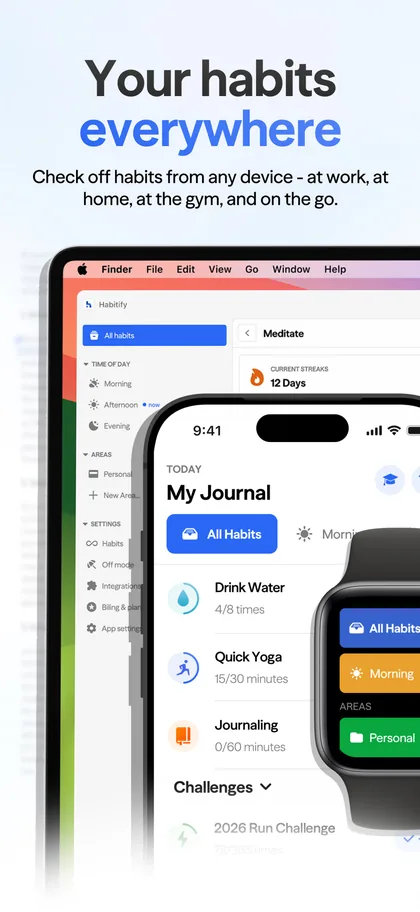
Screenshots from the Habitify listing on the App Store. Images by its developer.
Habitify takes a planner-first approach, sorting today into Morning, Afternoon and Evening, and layers a consistency heatmap inside its progress views alongside a dedicated home screen widget that displays up to 216 days.
Its real edge over phone-only grid trackers is reach. Habitify syncs across iPhone, iPad, Mac, Apple Watch, Android, Wear OS, Windows and the web, and with Pro it can auto-complete habits from Apple Health, Health Connect, Strava, Fitbit and Screen Time, plus connect to automation tools such as Zapier and IFTTT.
What it does well
- Every device in sync, including Mac, Windows, Apple Watch, Wear OS and the web.
- Consistency heatmap and 216-day heatmap widget, plus completion-rate charts and a daily score.
- Automatic logging and automation via Apple Health, Health Connect, Strava, Fitbit and Zapier.
Where it falls short
- The grid is not the home view. Launch opens onto today's checklist rather than a wall of heatmaps.
- Smallest free tier on this list at three active habits with one reminder each.
- Expensive for full features. Pro costs $8.99 a month, $49.99 a year or $119.99 for life on the US App Store, and syncing across devices requires an account.
- Pricing
- Free for three active habits. Plus is $29.99 a year; Pro is $8.99 a month, $49.99 a year or $119.99 lifetime on the US App Store, with a seven-day trial.
- Platforms
- iPhone, iPad, Mac, Apple Watch, Vision Pro, Android, Wear OS, Windows and the web.
- Ratings
- 4.6 from 7,212 ratings on the US App Store and 4.2 on Google Play.
Loop Habit TrackerNo 03 · Best Free Grid On Android
Loop Habit Tracker is the benchmark free, open-source habit tracker on Android, with no ads, no in-app purchases, no account and no internet permission.
Its main screen is a compact list showing the last few days, and tapping any habit opens a scrolling History calendar grid arranged just like a contribution graph: columns are weeks, rows are weekdays, and you can scroll back across your full history. Below it sit a Frequency dot grid by month and weekday, plus Loop's signature Habit Score, a rolling percentage that decays slowly after a missed day instead of resetting to zero. All six Android widgets, including History and Frequency widgets, are completely free.
What it does well
- Completely free and open source (GPLv3), with unlimited habits, six free widgets and zero ads.
- Weekday-by-week History grid and Frequency chart, paired with a forgiving Habit Score.
- Total offline privacy, requesting no internet permission and exporting clean CSV or SQLite backups.
Where it falls short
- Android only. There is no iPhone, iPad or web version, so switching phones means leaving Loop behind.
- The full grid lives inside each habit rather than showing every habit's multi-month heatmap together on launch.
- Slow store release cycle. Its last Google Play update was in September 2025, though version 2.3.2 reached GitHub in October 2026, and some recent Play reviews note delayed reminders on newer Android builds.
- Pricing
- Free, with no in-app purchases and no ads.
- Platforms
- Android, via Google Play or F-Droid.
- Ratings
- 4.7 from more than 63,000 reviews on Google Play.
TickTickNo 04 · Best For Tasks And Habits Together
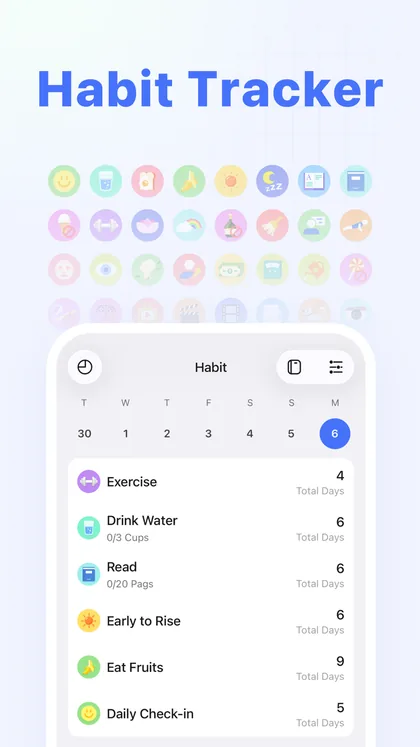
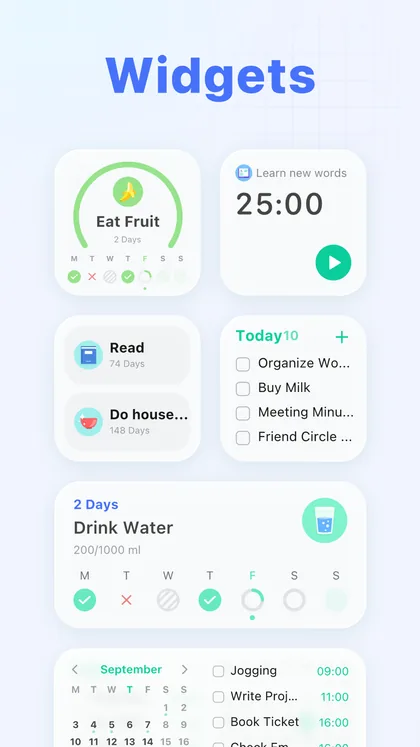

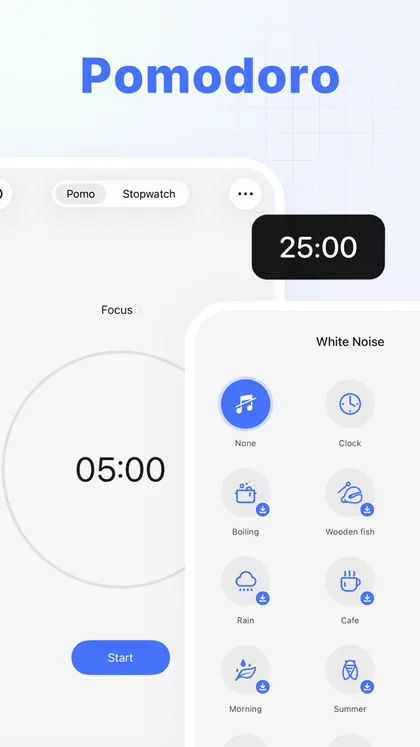
Screenshots from the TickTick listing on the App Store. Images by its developer.
TickTick is a full to-do list, calendar and Pomodoro app with a capable habit module built inside. Each habit includes a yearly Habit Heat Map view alongside streaks and completion stats, and TickTick offers a monthly Habit Heat Map widget on iPhone and Android so you can put a grid beside your daily task list.
For people who hate juggling two apps, having habits sit right next to calendar blocks and tasks is a real practical advantage, and TickTick runs on virtually every operating system.
What it does well
- Yearly Habit Heat Map and monthly heatmap widget right beside your tasks and calendar.
- Runs everywhere, including Windows, Mac, Apple Watch, Wear OS and the web.
- Generous five-habit free tier with basic widgets included.
Where it falls short
- Habits are a secondary module inside a busy task manager, so the heat map is tucked away rather than front and centre.
- No lifetime option. Full habit stats, unlimited habits and full widgets require TickTick Premium at $49.99 a year.
- Built around an account with a broad App Store privacy label compared with local-first habit apps.
- Pricing
- Free for five habits and basic widgets. Premium is $4.99 a month or $49.99 a year.
- Platforms
- iPhone, iPad, Mac, Apple Watch, Vision Pro, Android, Wear OS, Windows and the web.
- Ratings
- 4.9 from 47,131 ratings on the US App Store and 4.6 on Google Play.
DaylioNo 05 · Best For A Year In Pixels
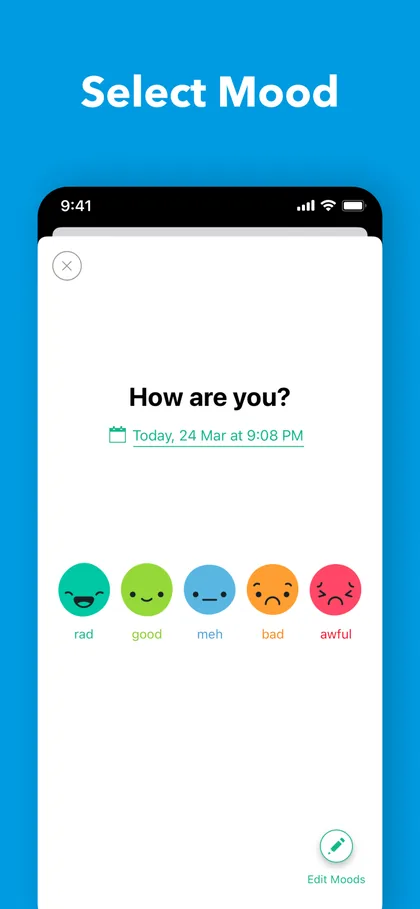
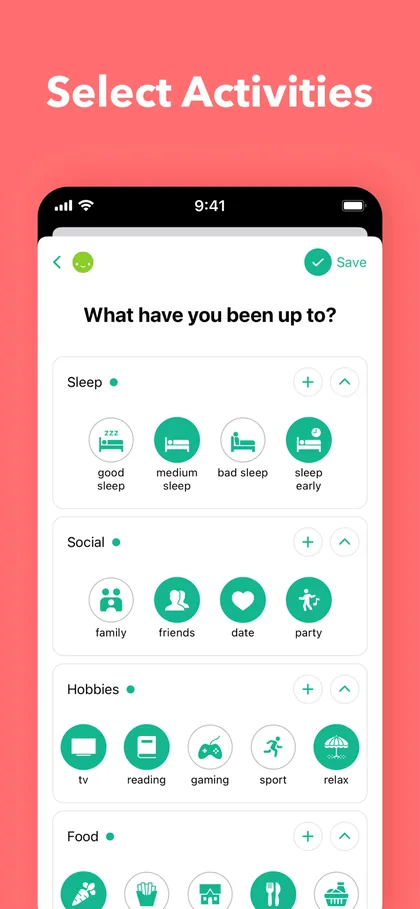
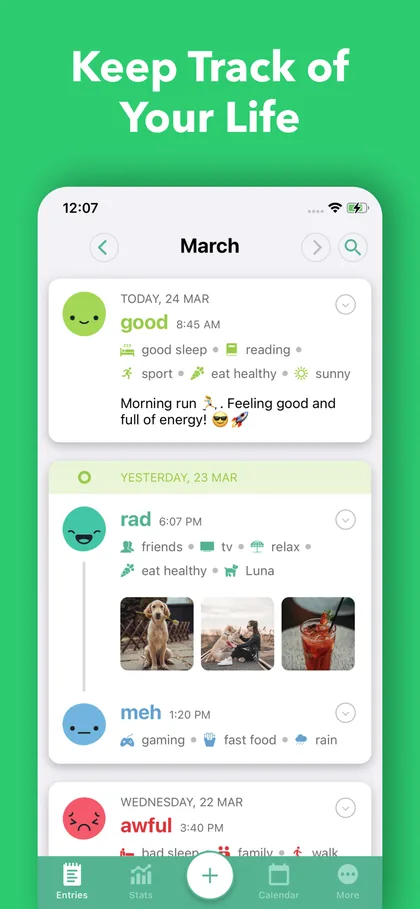
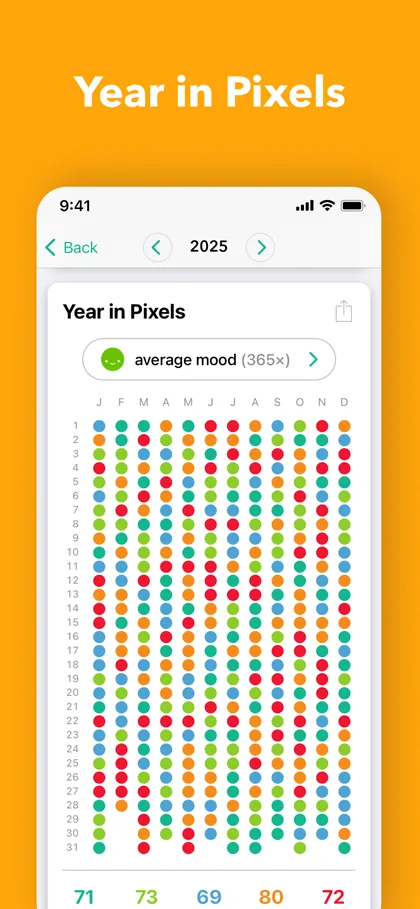
Screenshots from the Daylio listing on the App Store. Images by its developer.
Daylio is not a classic green-square habit tracker, yet its Year in Pixels grid belongs in this category for a simple reason: it turns all 365 days of your year into one glanceable mosaic of coloured squares. Instead of shading by habit volume, each pixel reflects your mood for the day, while activities and goals let you spot which habits correlate with your best stretches.
Entries stay on your device with no account required, optional iCloud or Google Drive backups, and CSV export on the free plan.
What it does well
- Year in Pixels mosaic gives an unmistakable 365-day visual record in seconds.
- Connects habits to how you actually feel, showing which activities align with better days.
- No account required, with local storage and free CSV export.
Where it falls short
- A mood journal first. Habit goals sit alongside activities rather than getting individual contribution grids on the main screen.
- Ads in the free version on Android, and unlimited goals, automatic backups and advanced stats require Premium.
- Single-device focus. Daylio's own FAQ notes it is not built for simultaneous multi-device use.
- Pricing
- Free diary; Premium in-app purchases on the US App Store run from $4.99 to $59.99.
- Platforms
- iPhone, iPad, Apple Watch, Vision Pro and Android.
- Ratings
- 4.8 from 62,610 ratings on the US App Store and 4.7 on Google Play.
How To Set Up A Contribution Grid You Will Actually Keep
Even the cleanest heatmap stalls if you overload it in week one. Four choices make a contribution grid easier to keep:
- Start with two to four habits, not twelve. Four solid colour blocks on your screen pull you back far more effectively than twelve half-empty rows that feel like a chore list. Our guide to starting smaller than feels worthwhile explains why small thresholds build denser grids.
- Use partial shading for variable days. If a reading or exercise habit ranges from five minutes to an hour, track it as a countable or measurable habit (Count or Measure in HabitKit) rather than binary yes/no. Seeing a pale tile on a busy Tuesday keeps the pattern alive without pretending you did a full session.
- Plan your rest days into the grid. A gym habit repeated three times a week, or on Monday, Wednesday and Friday, keeps off-days out of your streak calculation so planned recovery never looks like failure (taking a day off without breaking your streak).
- Put one grid on your first home screen. Harkin et al. (2016) found larger effects when progress is physically recorded rather than kept in your head. Putting a widget on your main home screen keeps both the record and the tap in front of you every time you unlock your phone (best habit tracker apps with widgets).
Frequently Asked Questions
What Is A GitHub-Style Habit Tracker?
A GitHub-style habit tracker displays each habit as a calendar heatmap modelled on GitHub's contribution graph: weeks run across in columns, days of the week run down in rows, and each completed day fills one square in colour. Instead of reducing your history to a single streak number, it shows months or a full year of consistency in one view.
Why Is A Heatmap Better Than A Streak Counter?
A streak counter only tells you how long your current uninterrupted run is, so one missed day after two months resets it to zero. Research by Silverman and Barasch (2023) shows that seeing a broken streak lowers subsequent engagement independently of how much you actually did. A heatmap keeps every earlier week visible beside a single empty square, which makes it much easier to pick up again the next day.
Which GitHub-Style Habit Tracker Works On Both iPhone And Android?
HabitKit, Habitify, TickTick and Daylio all run on both iPhone and Android. Loop Habit Tracker is Android only. HabitKit also lets you move your full tile history between iPhone and Android with a free export file (moving to a new phone).
Is There A Free GitHub-Style Habit Tracker?
Yes. HabitKit is free for four habits with no time limit, including notes, reminders, backups and free grid image sharing. Loop Habit Tracker is completely free and open source on Android with unlimited habits. Habitify (three active habits), TickTick (five habits) and Daylio (unlimited diary with ads on Android) also have free plans.
Can I Track Partial Progress On A Habit Heatmap?
In HabitKit, Count and Measure habits fill each day's tile through five progressive partial shades, growing stronger at 20%, 40%, 60% and 80% of your daily goal before reaching full colour at 100%. Loop Habit Tracker records measurable entries and charts totals over time, while binary check-in heatmaps show only empty or filled squares.
Final Thoughts
GitHub's contribution graph spread far beyond software because it got one human truth right: seeing the whole body of work beats staring at a brittle counter. When a missed day looks like one empty square inside three solid months of colour, showing up tomorrow feels natural instead of like starting over.
If you want that grid to be the entire experience on iPhone or Android, start with two or three habits in HabitKit for free and watch the first month fill in. Get it on the App Store or Google Play.
Sources
Checked on the date at the top of this page. App names, icons and screenshots belong to their developers and are shown to identify and illustrate each app; HabitKit is not affiliated with any of them.
- Palmer, J. (2013, January 7). Introducing Contributions. The GitHub Blog.
- Vessels, S. (2016, May 19). More contributions on your profile. The GitHub Blog.
- Harkin, B., Webb, T. L., Chang, B. P. I., Prestwich, A., Conner, M., Kellar, I., Benn, Y., & Sheeran, P. (2016). Does monitoring goal progress promote goal attainment? A meta-analysis of the experimental evidence. Psychological Bulletin, 142(2), 198-229. 10.1037/bul0000025
- Silverman, J., & Barasch, A. (2023). On or off track: How (broken) streaks affect consumer decisions. Journal of Consumer Research, 49(6), 1095-1117. 10.1093/jcr/ucac029
- Lally, P., van Jaarsveld, C. H. M., Potts, H. W. W., & Wardle, J. (2010). How are habits formed: Modelling habit formation in the real world. European Journal of Social Psychology, 40(6), 998-1009. 10.1002/ejsp.674
- HabitKit on the US App Store and Google Play
- Habitify on the US App Store, Google Play and its help center: plans, guest accounts, home screen widgets and supported platforms
- Loop Habit Tracker on Google Play, loophabits.org, Loop's FAQ and its GitHub repository
- TickTick on the US App Store, Google Play, TickTick widget help and TickTick Premium
- Daylio on the US App Store, Google Play, Daylio FAQ and Daylio Premium features