
A Day You Completed Looks Empty Or Missing
By Sebastian Röhl, creator of HabitKit
6 min read Published Updated Instructions for HabitKit 1.18.0
A pale tile can mean you logged progress without reaching the daily goal. Check the day’s amount and goal before changing it. A whole missing habit or several missing weeks need a different check from one pale day.
On this page
Inspect The Day First
Open the habit, scroll to the month calendar and press and hold the day you want to inspect. The day editor shows its progress and any note. A normal tap can change the amount, so use the long press when you only want to check.
For a Count or Measure habit, compare the logged amount with that day’s goal. Measure habits can contain decimal amounts. A day reaches full colour and counts towards the streak when its amount meets or exceeds the goal.
Partial progress has five shades. As progress passes 20, 40, 60 and 80 percent of the goal, the tile becomes stronger. Reaching the goal gives it the full habit colour. A partial day is still recorded even though it does not count as a completed day for a build habit’s streak.
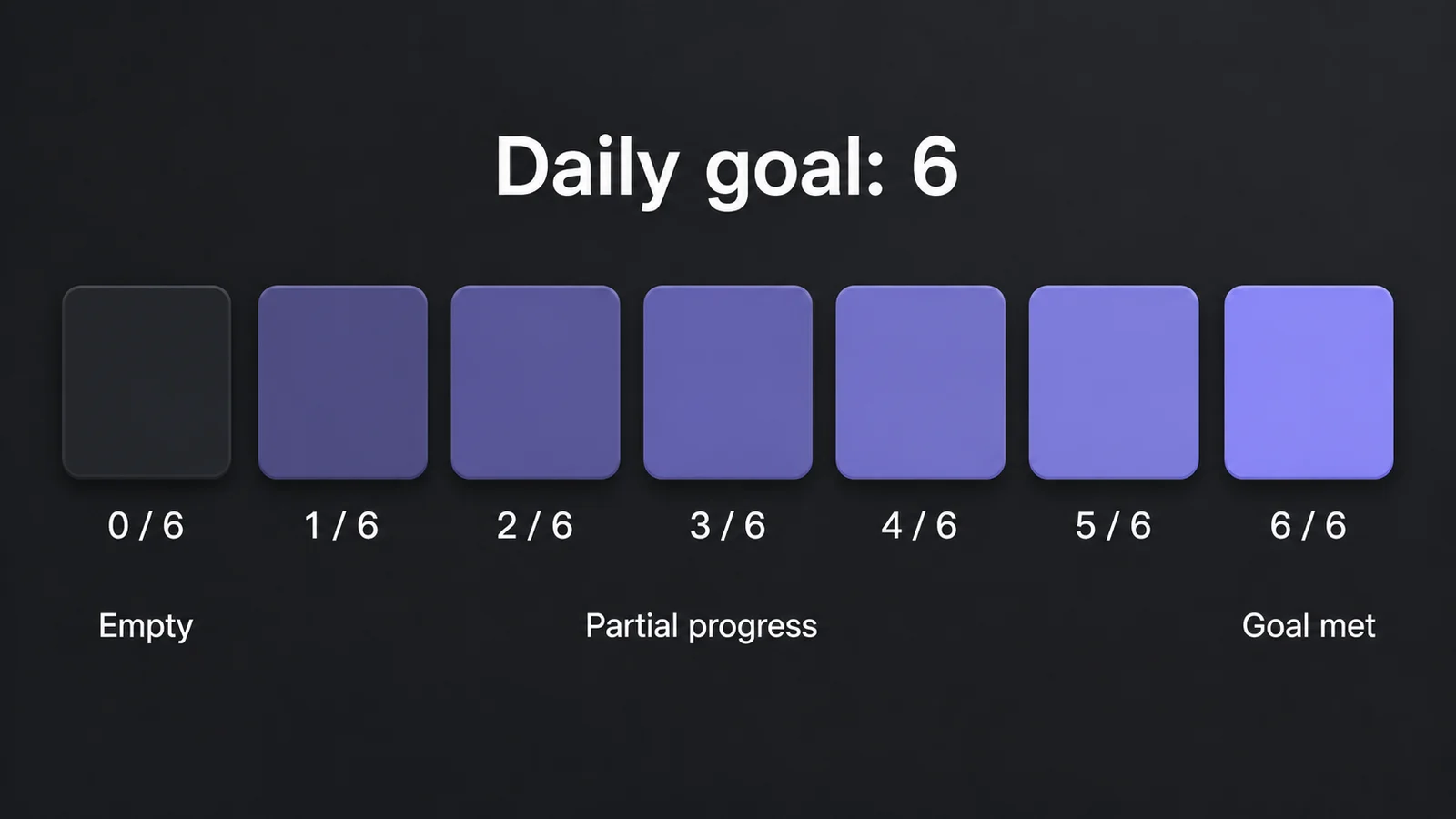
For a goal of six, amounts one through five show increasing partial shades. Six reaches full colour.
A note is separate from a completion. Writing a note does not fill the day. You can keep a note on a day with no logged progress, then add a completion later. See log a completion and fix a past day.
Correct The Amount
On a Yes/No build habit, a tap toggles between complete and empty. If you tapped a completed day by mistake, tap it again to restore it.
For Count and Measure, check On Tap in the habit editor. Add 1 increases progress below the goal; Enter total opens the value sheet immediately. At or above the goal, both open the sheet instead of resetting the amount to zero, including a goal of one.
For direct editing, press and hold the completion indicator on any Count or Measure habit, including a goal of one, to open the value sheet. Check its date, enter the amount you intended and save it. Use the 0 chip when you deliberately want to clear the amount, then tap Save. The note can remain separate from the amount.
See daily goals and multiple completions for the full tap behaviour and the difference between Count and Measure.
Check Which History You Are Viewing
The habit is archived. Archived habits leave the overview and widgets but keep their history. Look in Settings › Archived Habits. Restoring an archived habit requires Pro.
A widget shows a shorter window. A day can exist in the app without appearing in a home screen widget. Open the habit’s calendar to inspect the date directly.
It is a quit habit. A Yes/No quit habit starts with a clean day; recording a slip changes its meaning. Count and Measure quit habits instead track a daily limit, and reaching that limit marks the day as slipped. Days before tracking began or inside a locked previous quit period can also be read-only. See track a habit you want to quit before trying to change those days.
App And Widget Disagree
Open HabitKit and compare the date and amount on the habit’s detail page. If the app is correct but the widget is behind, follow widgets are not updating.
If the app also shows an unexpected amount, inspect it before tapping repeatedly. Correct it with the value sheet for a numeric habit, or toggle a Yes/No day once if needed. If the amount changes again or the surfaces continue to disagree, send support the habit type, date and screenshots of both views.
Remove a widget that still points to a deleted habit, or choose a current habit for it. It should not remain attached to a habit you no longer track.
Midnight And Time Zones
Days run from midnight to midnight on the device clock. There is currently no custom day-start setting. A completion logged at 00:20 belongs to the new day.
To correct the date, log the amount on the intended day and clear it from the wrong one. The date on the value sheet is a label; it does not move an existing completion. For a Yes/No build habit, toggle the two days as needed. For a numeric habit, use its value sheet.
Stored completions keep the local date on which they were recorded, so changing time zone should not move your earlier history to another day.
If Several Days Are Missing
Check your backups: on iPhone, Settings › Backup & Restore › Restore a backup, which lists your daily iCloud backups and the snapshots on the phone; on Android, Settings › Data Import/Export › On-Device Backups. HabitKit keeps up to seven daily snapshots on the device, plus separate snapshots saved before imports and restores. Restoring one is free, but it replaces the current data. Check the date carefully, and export your current data first if you want to preserve it.
After an Android device restore, these snapshots may be available even if the overview is empty. Automatic backups and recovery explains how to restore one.
If the list is empty or restoring does not help, contact support. Do not uninstall while trying to recover data, because that removes the on-device copies. HabitKit will not open or shows an error explains what to include in a report.
Related Questions
Does Tapping A Completed Day Reset It?
A Yes/No build habit toggles off with another tap. A Count or Measure day at its goal opens the value sheet instead of resetting to zero, including a goal of one. Use the 0 chip and Save there only when you want to clear the amount.
Why Does A Day With A Note Look Empty?
A note does not count as a completion. Check the logged amount for that day and add the progress you want to record. The note can stay even if the amount is zero.
I Logged A Completion After Midnight. Which Day Gets It?
The new day. HabitKit currently uses midnight as the day boundary. Log the intended amount on the correct day and clear the amount from the wrong one.