
How HabitKit Streaks Work And Why Yours Shows Zero
By Sebastian Röhl, creator of HabitKit
7 min read Published Updated Instructions for HabitKit 1.18.0
A new build habit starts with Streak Goal set to None, so logging days alone does not start its streak. Choose a Daily, Week or Month goal to count a run. Quit habits work differently: they count consecutive clean days automatically, as explained in tracking a habit you want to quit.
The rest of this page is where that setting lives, what the four options actually do, and why a weekly streak reading 6 after two weeks is right rather than broken.
On this page
Why A New Habit Shows Zero
New build habits start with Streak Goal set to None. Find the setting directly on the New Habit or Edit Habit screen, beside Reminder.
None means there is no schedule for a streak to follow. Your entries still save, and the grid still shows whether each day is empty, partly complete or at its daily goal. A habit that has never had a streak goal stays at 0. Switching an existing goal to None behaves differently; see pausing a habit.
Two places tell you, if you know what you are looking at:
- The goal chip on the habit reads No Streak Goal.
- The charts page hides the streak figures and says you need to set a streak goal for the habit, which you can do when editing it.
To fix it:
- Open the habit and tap Edit.
- Tap Streak Goal.
- Choose Daily, Week or Month, then go back to the edit screen.
- Tap Save. The goal starts today. Days previously tracked under None remain in the grid but do not become a new streak retrospectively.
The Four Streak Goal Options
Tapping Streak Goal opens a list headed Interval with four rows, and there are no others:
- None. No streak schedule. A new habit does not begin a streak; an existing run can pause.
- Daily. Every day has to meet the goal.
- Week. A set number of qualifying days per week.
- Month. A set number of qualifying days per calendar month.
There is no every-second-day or every-three-days schedule, and no way to choose particular weekdays for the streak goal. A weekly goal lets you choose which days to complete: five days a week is five distinct days, in any order. Reminder weekdays only control notifications.
Choosing Week or Month reveals a stepper labelled Completions Per Interval, shown as 3 / Week. Week starts at 3, month starts at 5. The minimum is 1 either way. The maximum is 7 per week and 31 per month.
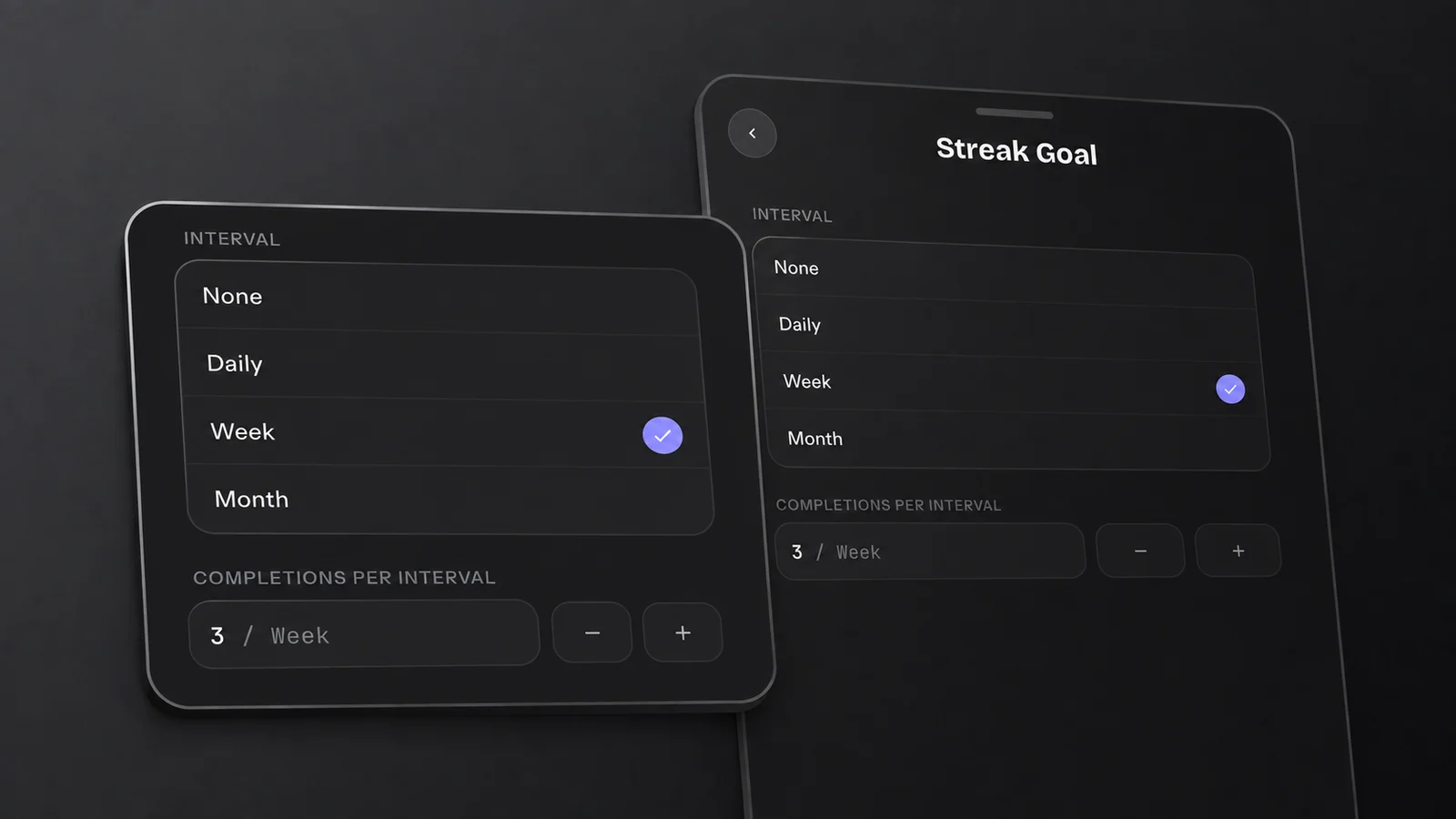
This example requires three distinct days meeting the daily goal each week. Three taps on one day count as one successful day at most.
How A Daily Streak Counts
A daily streak walks every calendar day from your first qualifying completion up to today. A day that meets the goal extends the streak. A day that does not breaks it.
Two details do most of the work:
- Today never breaks it. An unfinished today is skipped, not counted as a miss, so the streak you see in the morning is yesterday's streak. Miss yesterday and it breaks the moment the date rolls over.
- A day only counts if it meets its daily target. For Yes / No, that means checking it off. For Count or Measure, it means reaching Daily Goal. With a count goal of three, two completions leave the day below target even though the tile shows partial progress. Going over the goal still counts the day once. See set a daily goal and track multiple completions a day.
The daily streak number counts days. Weekly and monthly streaks also count successful days, but they allow gaps between them.
How Weekly And Monthly Streaks Count
With a weekly goal, you need the chosen number of successful days within each week. A day off is fine while that target is still reachable. It breaks the run if the week ends below target, or the remaining days are no longer enough to meet it.
Then the part that surprises people: a week that meets its goal adds the number of qualifying days in it, not one. Log exactly three successful days in each of two weeks on a 3 / Week goal and the streak reads 6. Four such weeks give 12. If you complete more than three days in a successful week, those extra days count too.
The current week gets the same benefit of the doubt that today gets on a daily goal. While the target is still mathematically reachable in the days left, the week cannot break the streak. On a 3 / Week goal with nothing logged and only Saturday and Sunday remaining, the target is out of reach, and the streak breaks there and then rather than waiting for Monday.
Monthly goals work the same way with calendar months. A target of twenty means at least twenty successful days in any arrangement. A successful month adds all its qualifying days to the streak.
One more thing to know: weeks begin where you told the app they begin, under Settings › General, with Week Starts On as the first row. The default is Monday. Change it and the same taps can fall either side of a boundary and score differently. How the habit grid works covers that setting in more detail.
Changing The Goal Later
Changing Streak Goal or Daily Goal applies the new target from today. Earlier days keep their previous goals, and your logged amounts stay saved. There is no Past Streaks dialog or option to apply the new goal to your whole history.
Today's tile and streak can change immediately because today uses the new target. If you change it again on the same day, the latest choice is the goal for today.
One more consequence worth knowing: a new goal you never meet ends the streak rather than freezing it. Raise a daily goal from one to three, keep logging one, and the old streak closes out. The days you logged are still there. They no longer clear the bar.
If what you want is a streak that survives a planned day off, that is a different question with its own answer: take a day off without breaking your streak.
Related Questions
I Completed Today, So Why Is My Streak Still 0?
For a build habit, check whether Streak Goal is None, the default for new habits. Edit it, choose Daily, Week or Month, then save. Also check that today's amount meets Daily Goal; a partly completed day does not count. Quit habits have separate clean-day streaks.
My Weekly Streak Says 12 After Four Weeks. Is That A Bug?
No. A weekly streak counts successful days, not weeks. Exactly three qualifying days in each of four weeks gives a streak of 12. Extra successful days count too.
Does Changing My Streak Goal Wipe My History?
No. A goal change starts today and preserves earlier goals and logged amounts. Today's result may change to reflect the new target, but the app does not apply it to your whole history.