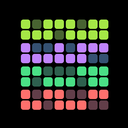
HabitKit 1.0 reached the App Store in November 2022 with one idea: show a habit as a grid of tiles, one per day, so you can see at a glance whether you are showing up.
Release notes · 1.0
Track any habit and watch it fill in as a colorful tile grid, up to a year of completions on one screen, grouped by month, so gaps are obvious.
- Name, description, an icon from six categories and one of 17 colors per habit; light, dark or system theme.
- Open a habit's calendar and tap any past day to add or remove a completion.
- Archive habits instead of deleting them, and reorder from Settings.
- Back up to a JSON file you save or share yourself, and import it on a new phone. Nothing is uploaded anywhere.
- Four habits free; Pro (monthly, annual or lifetime) unlocks unlimited habits, import and export, and restoring archived habits.
Since then Export and import have been free for everyone since 1.18.2.
A Year On One Screen
Track any habit and watch it fill in as a colourful tile grid, up to a year of completions on one screen, grouped by month, so the gaps are obvious. It is still the heart of the app; how the habit grid works explains how to read it.
Your Habits, Your Way
Each habit got a name, a description, an icon from six categories and one of 17 colours, in a light, dark or system theme. Open a habit's calendar and tap any past day to add or remove a completion. Archive habits instead of deleting them, and reorder them from Settings. Install HabitKit and create your first habit shows how it starts today.
No Account, No Upload
Back up to a JSON file you save or share yourself, and import it on a new phone. Nothing is uploaded anywhere. Four habits were free, and Pro, monthly, annual or lifetime, unlocked unlimited habits, import and export, and restoring archived habits. Export and import has been free for everyone since 1.18.2.